
How to Audit a Facebook Ad Account Before Scaling: A 30-Minute Pre-Flight Checklist for Media Buyers
Scaling a Facebook ad account without auditing it first is like doubling down on a poker hand without looking at your cards. You might get lucky. More likely, you will amplify every hidden problem — broken tracking, fatigued creatives, overlapping audiences, inefficient budget allocation — at 2x or 3x the cost.
This facebook ad account audit checklist is designed for media buyers who need a systematic, time-boxed review before increasing spend. It covers six critical areas in 30 minutes, organized by priority. Run through it before any major budget increase, when onboarding a new client account, or as a quarterly health check.
The goal is not a comprehensive forensic audit. It is a pre-flight checklist — catching the issues that will cost you money at scale before you hit the throttle.
Section 1: Pixel and Conversion Tracking Health (5 Minutes)
This is the most important check. If your tracking is broken, every optimization decision is based on wrong data.
Check 1.1: Pixel Status
Open Events Manager → Data Sources → Select your pixel.
- Is the pixel active? Check for recent event activity (last 24 hours).
- Event match quality score: Target 6.0+ out of 10. Below 5.0 means significant data loss.
- Server-side events: Verify Conversions API (CAPI) is active alongside the browser pixel. Post-iOS 14, CAPI is essential for accurate tracking.
Check 1.2: Conversion Event Verification
Review all standard and custom events:
- Purchase event — Does the value match your backend? Compare Facebook-reported revenue vs. actual revenue for the last 7 days. Variance under 15% is acceptable; above 25% signals a tracking problem.
- Add to Cart / Initiate Checkout — Are these firing at expected rates? If ATC is 10x your purchase count, your funnel is normal. If it is 100x, something is broken.
- Duplicate events — Check for double-firing. Open Test Events tool, trigger a conversion on your site, and verify it counts exactly once.
- Custom conversions — Are any outdated or broken? Remove anything no longer relevant.
Check 1.3: Attribution Settings
- Default attribution window: 7-day click, 1-day view is standard. Verify it hasn't been changed accidentally.
- Consistency: Are all campaigns using the same attribution window? Mixed windows make performance comparison impossible.
Red flags: Pixel not receiving events for 24+ hours, event match quality below 5.0, revenue variance above 25%, duplicate firing detected.
Section 2: Campaign Structure Review (5 Minutes)
Poor structure does not hurt at low budgets. At scale, it bleeds money.
Check 2.1: Campaign Organization
- Naming convention: Are campaigns named consistently? You need to identify campaign type, audience, and objective at a glance. Example:
[PROSP] US_LookAlike1%_Video_Purchase - Campaign objective alignment: Is each campaign using the correct objective? Awareness campaigns should not be optimized for purchases. Conversion campaigns should not target link clicks.
- Campaign count: Are there too many active campaigns splitting budget? More than 5–8 active campaigns often means fragmented learning and audience overlap.
Check 2.2: Ad Set Structure
- Audience overlap: Use the Audience Overlap tool in Audiences. Overlap above 30% between ad sets means you are bidding against yourself.
- Ad set count per campaign: For CBO, 3–8 ad sets is optimal. For ABO, keep to what your budget supports (minimum $20–30/day per ad set).
- Learning phase status: How many ad sets are stuck in "Learning Limited"? These are not getting 50 conversions/week — either consolidate them or increase budget.
Check 2.3: Exclusions
- Customer exclusions: Are existing purchasers excluded from prospecting campaigns? This is free money if missing.
- Cross-campaign exclusions: Are retargeting audiences excluded from prospecting?
- Placement exclusions: Are you running on Audience Network without specifically wanting to? For most performance campaigns, this placement underperforms.
Red flags: More than 30% audience overlap, multiple "Learning Limited" ad sets, no customer exclusions on prospecting campaigns.
Section 3: Creative Performance Analysis (5 Minutes)
Creatives are the single biggest lever for Facebook Ads performance. A quick audit catches fatigue and waste.
Check 3.1: Creative Fatigue Signals
For each active ad, check:
- Frequency: Above 3.0 for cold audiences = fatigue risk. Above 5.0 = almost certainly fatigued.
- CTR trend (7-day): Declining CTR with rising frequency = creative fatigue confirmed.
- CPA trend (7-day): Rising CPA despite stable targeting = creative issue.
Check 3.2: Creative Diversity
- How many unique creatives are active? Fewer than 3 active creatives per ad set is a risk — if one fatigues, there is no backup.
- Format diversity: Are you running image-only? Add video. Video-only? Add carousel. Diversification extends creative lifespan.
- Copy variations: Same image with different headlines counts as different creatives. Test at least 2–3 copy angles per visual.
Check 3.3: Bottom Performers
Identify the bottom 20% of creatives by CPA over the last 14 days:
- Pause anything with CPA 50%+ above target that has spent more than 2x your target CPA.
- Archive deprecated creatives that have been paused for 30+ days.
- Check ad disapprovals — any rejected ads that should be fixed or resubmitted?
Red flags: Average frequency above 4.0 on cold audiences, fewer than 3 active creatives per ad set, no new creatives added in the last 14 days.
Section 4: Audience Health Check (5 Minutes)
Check 4.1: Audience Saturation
For each active audience:
- Audience size vs. daily budget: If your daily budget can reach 10%+ of the audience daily, saturation is imminent.
- Frequency by audience: Compare frequency across ad sets. The highest-frequency audiences need expansion or replacement.
- Reach plateau: Is reach growing or flat? Flat reach with increasing spend = the algorithm cannot find new people.
Check 4.2: Lookalike Freshness
- When were LAL seeds last updated? If over 60 days, refresh them with current customer data.
- Seed quality: Are LALs based on purchasers or just website visitors? Upgrade weak seeds.
Check 4.3: Custom Audience Health
- Audience sizes: Are Custom Audiences shrinking? Check retention windows — a 30-day website visitor audience during a traffic dip gets dangerously small.
- Email list freshness: When was the customer list last uploaded? Upload monthly at minimum.
Red flags: Any audience with frequency above 4.0 and declining CTR, LAL seeds older than 60 days, Custom Audiences below 1,000 users.
Section 5: Budget and Bidding Review (5 Minutes)
Check 5.1: Budget Distribution
- CBO budget allocation: Is one ad set consuming 80%+ of CBO budget? Check if that is justified by performance or if you need min/max spend limits.
- ABO budget balance: Are any ad sets chronically underspending? This signals audience or creative issues.
- Daily vs. lifetime budgets: Lifetime budgets give the algorithm more flexibility but make daily pacing harder to monitor.
Check 5.2: Spend Pacing
- Underspending campaigns: Campaigns spending less than 80% of budget have delivery issues. Check audience size, bid caps, and creative approval status.
- Overspending risk: Any campaigns without daily budget caps? At scale, runaway spend happens.
Check 5.3: Bid Strategy
- Lowest cost (default): Appropriate for most campaigns. Works well when scaling gradually.
- Cost cap: Good for maintaining CPA targets at scale. Verify the cap is not set too low (causes underspend) or too high (defeats the purpose).
- Bid cap: Advanced. Only use if you understand auction dynamics deeply. Too-low bids kill delivery.
Red flags: Any campaign spending less than 70% of budget consistently, CBO with one ad set consuming 85%+ spend, bid caps set without recent CPA benchmarking.
Section 6: Competitive Context (5 Minutes)
This is the audit section most checklists miss — and it is critical before scaling.
Check 6.1: Competitive Activity
Before increasing your budget, check what competitors are doing:
- New competitor creatives: Are competitors launching fresh campaigns in your niche? Increased competition means higher CPMs for everyone.
- Competitor ad longevity: Which competitor ads have been running 14+ days? These are proven winners — study their angles for creative inspiration.
- Format trends: Are competitors shifting to video, UGC, or carousel? If the market is moving, your creatives need to follow.
Check 6.2: Using Adligator for Competitive Audit
Adligator makes the competitive section of your audit fast and data-driven:
- Search by competitor name or keyword to see all their active ads
- Filter by days active to separate proven performers from tests
- Check ad format distribution to spot creative trends in your niche
- Set up live trackers for ongoing monitoring between audits
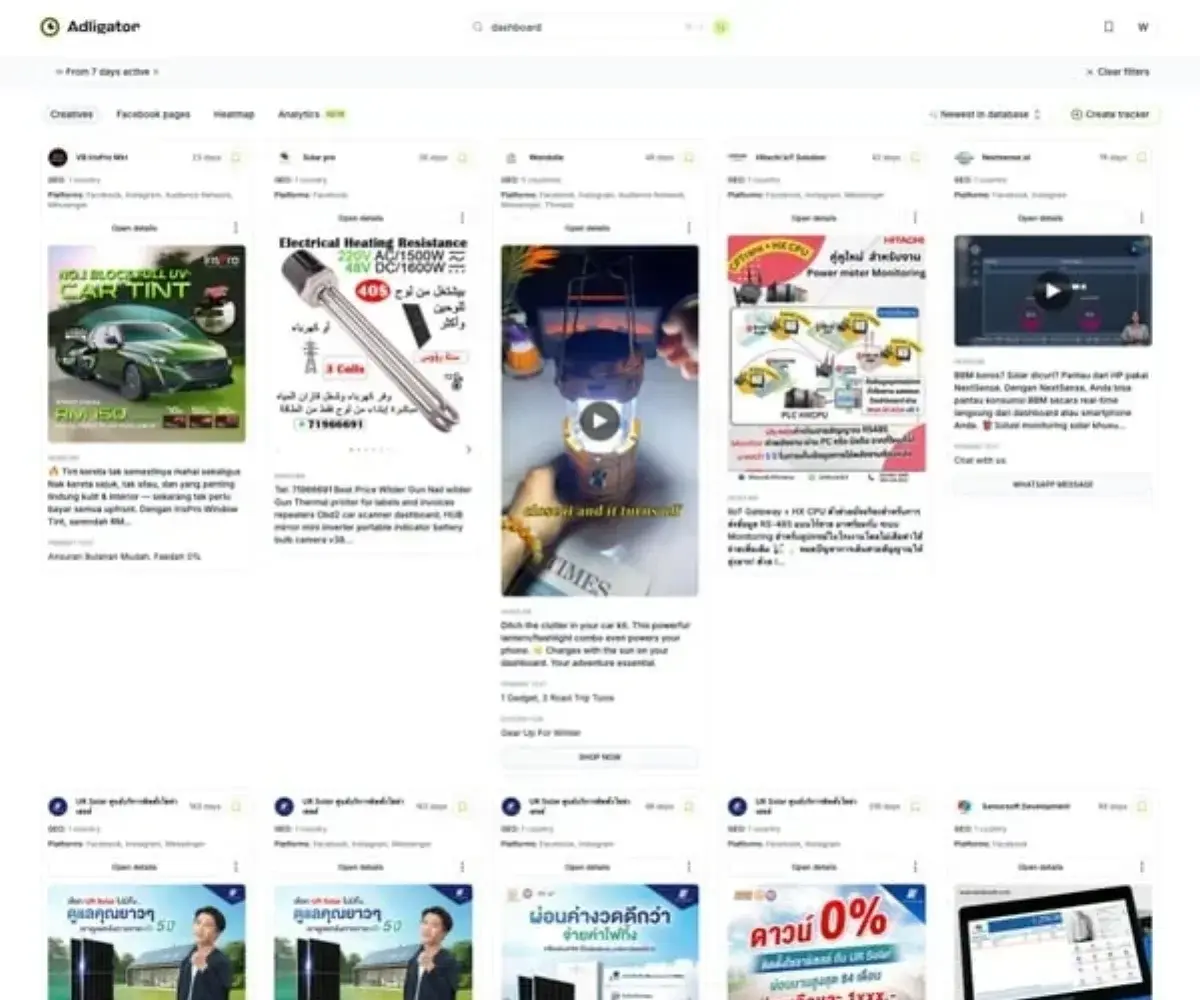 Add competitive context to your audit — check what competitors are running before you scale.
Want to add competitive analysis to your audit workflow? Try Adligator Free — Add Competitive Analysis to Your Audit
Red flags: Three or more competitors launched new campaigns in the last 7 days (CPM increase likely), competitors shifting to formats you are not testing.
The Complete 30-Minute Audit Checklist
Copy this checklist and run through it before any major scaling decision:
Pixel & Tracking (5 min)
- Pixel active with events in last 24 hours
- Event match quality 6.0+
- CAPI active alongside browser pixel
- Purchase revenue within 15% of backend data
- No duplicate event firing
- Attribution window consistent across campaigns
Campaign Structure (5 min)
- Consistent naming convention
- Correct objectives per campaign
- Audience overlap below 30%
- No "Learning Limited" ad sets (or plan to fix)
- Customer exclusions on prospecting
- Placement settings reviewed
Creative Performance (5 min)
- No cold audience frequency above 4.0
- CTR trends stable or improving
- Minimum 3 active creatives per ad set
- Bottom 20% performers paused
- New creative added in last 14 days
- No ad disapprovals pending
Audience Health (5 min)
- No audiences at saturation point
- LAL seeds refreshed within 60 days
- Custom Audiences above minimum viable size
- Email lists uploaded within 30 days
Budget & Bidding (5 min)
- Budget distribution balanced (CBO not over-concentrating)
- No campaigns chronically underspending
- Bid strategies appropriate for objectives
- Daily caps in place on all campaigns
Competitive Context (5 min)
- Competitor creative activity checked
- Competitor ad longevity analyzed
- Format trends identified
- Competitive monitoring set up for ongoing tracking
FAQ
How often should I audit my Facebook ad account?
Run a full audit before any major budget increase (50%+), when onboarding a new client, and quarterly as routine maintenance. Quick health checks (pixel status, creative fatigue, spend pacing) should happen weekly as part of your regular reporting workflow.
What is the most important thing to check before scaling Facebook Ads?
Pixel health and conversion tracking accuracy. If your data is wrong, every optimization decision built on it is also wrong. Verify that your pixel fires correctly on all conversion events, that there is no duplicate firing, and that the numbers roughly match your backend data (within 10–15% variance).
Can I audit a Facebook ad account in 30 minutes?
Yes, using a structured checklist. The 30-minute audit covers the highest-impact areas: pixel health (5 min), campaign structure (5 min), creative performance (5 min), audience health (5 min), budget allocation (5 min), and competitive context (5 min). Deeper dives into specific issues flagged during the audit may require additional time.
Conclusion
A facebook ad account audit checklist is not optional — it is insurance against amplifying problems at scale. The 30-minute pre-flight check covers the six areas that cause 90% of scaling failures: tracking accuracy, campaign structure, creative health, audience saturation, budget allocation, and competitive context.
Run this checklist before every major budget increase. Catch the issues at $100/day so they do not become catastrophes at $1,000/day. And add competitive intelligence to your audit process — because the most perfectly optimized account still underperforms if you are blind to what the market is doing.
Ready to add competitive context to your next audit? Try Adligator Free — Add Competitive Analysis to Your Audit
See What Competitors Are Running Before You Scale
Related Reading
- How to Allocate Your Facebook Ads Budget for Testing: A Practical Framework for Solo Media Buyers
- Facebook Ad Account Structure and Naming Conventions: A Scaling Framework for Media Buyers
- Facebook Ad Compliance Guide for Media Buyers: How to Avoid Account Bans While Running Aggressive Creatives in 2026
- Top 10 Facebook Ads Mistakes That Waste Budget: An Audit Checklist for Media Buyers (2026)
