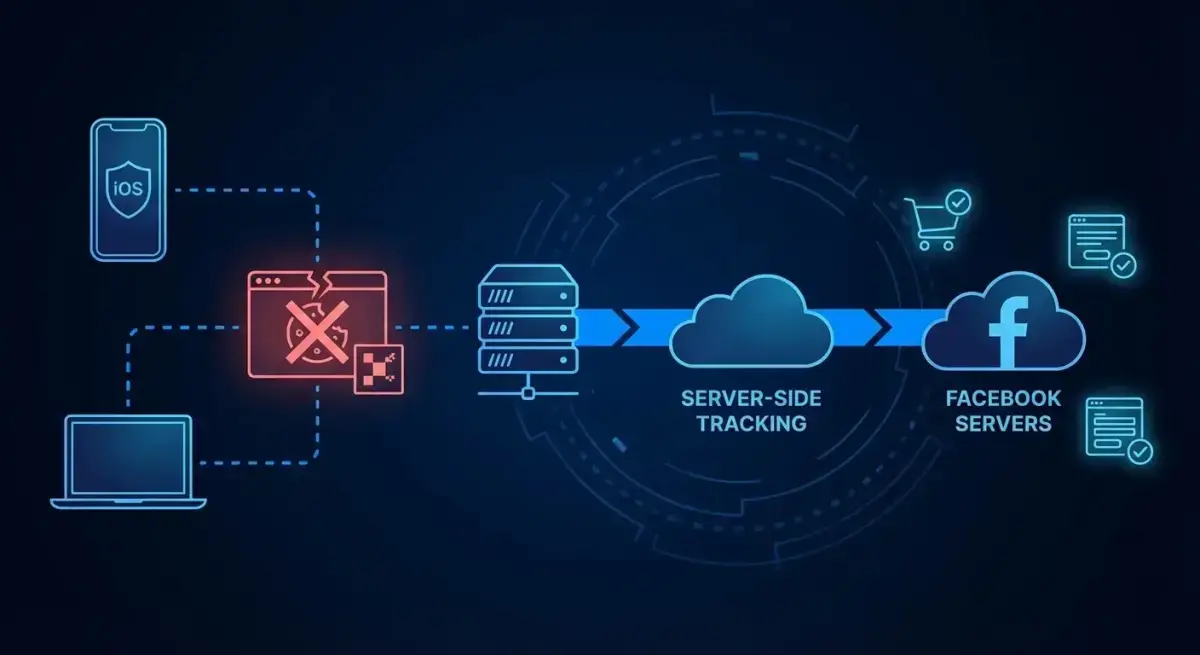
Facebook Ads Attribution in 2026: CAPI, Server-Side Tracking, and iOS Privacy Solutions
Attribution has become the biggest headache for Facebook advertisers. Between iOS privacy changes, cookie deprecation, and evolving browser restrictions, the data you see in Ads Manager tells an increasingly incomplete story.
The gap between reported conversions and actual conversions can be 20-40% for many advertisers. That means you're making budget decisions on partial data — and potentially killing campaigns that are actually profitable.
This guide covers everything media buyers need to know about Facebook ads attribution in 2026: how CAPI works, how to set up server-side tracking, which attribution windows to use, and how to bridge the data gap that privacy changes created.
The Attribution Problem: Why Your Numbers Don't Match
If you've ever compared Facebook Ads Manager conversions with your actual sales data and found a significant gap, you've experienced the attribution problem firsthand.
What Caused the Gap
Several converging trends created this situation:
- iOS 14.5+ ATT (App Tracking Transparency). Apple requires apps to ask permission before tracking. Roughly 75-80% of iOS users opt out. This means Facebook can't track most iOS users across apps and websites.
- Browser privacy features. Safari's ITP (Intelligent Tracking Prevention) and Firefox's ETP (Enhanced Tracking Protection) limit cookie lifetimes and block third-party tracking.
- Ad blockers. Approximately 30% of desktop users run ad blockers that prevent Facebook Pixel from firing.
- Cookie consent regulations. GDPR, CCPA, and similar regulations require explicit consent before placing tracking cookies. Many users decline.
The cumulative effect: browser-based Facebook Pixel tracking misses 30-40% of conversions for many advertisers. The data exists — people are buying — but Facebook can't see it.
Why This Matters for Media Buyers
Incomplete attribution directly impacts your ability to:
- Optimize campaigns. Facebook's algorithm needs conversion data to optimize delivery. Fewer reported conversions = worse optimization.
- Evaluate performance. A campaign showing 2x ROAS might actually be delivering 3x ROAS — or the opposite.
- Allocate budget. Without accurate attribution, you can't confidently shift budget between campaigns, audiences, or channels.
- Report to clients/stakeholders. Inconsistent numbers erode trust.
Facebook Pixel vs CAPI: What Changed and Why
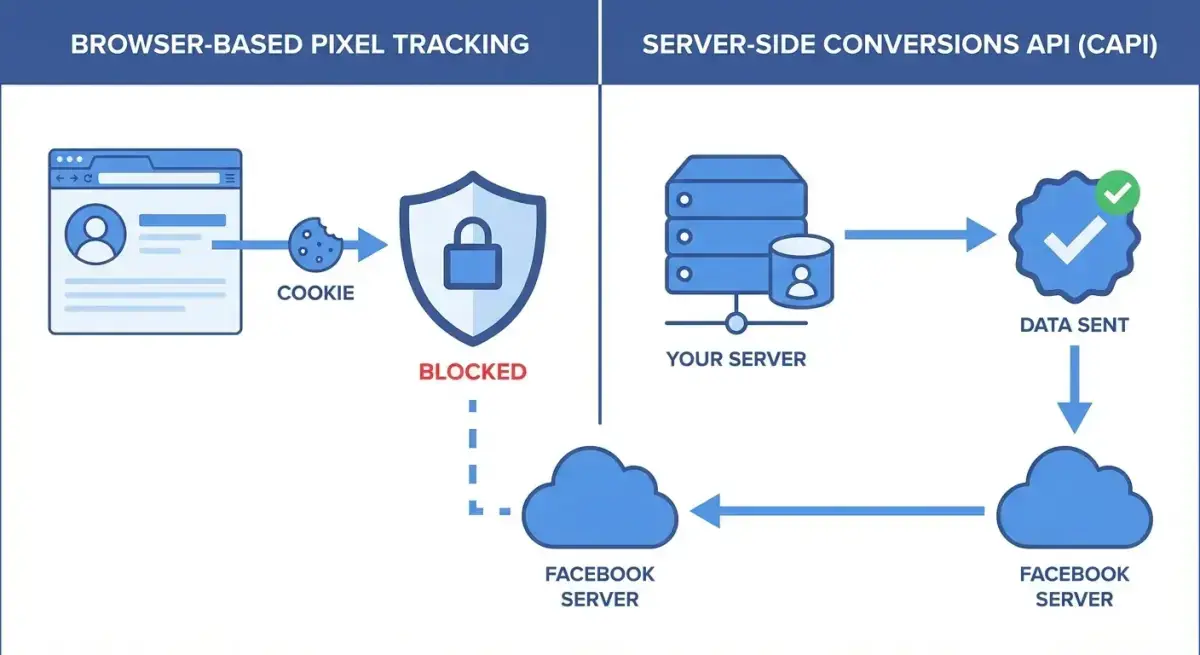 Pixel vs CAPI: why server-side tracking recovers lost conversions
How Facebook Pixel Works (Browser-Side)
The Facebook Pixel is a JavaScript snippet that runs in the user's browser. When someone takes an action (page view, add to cart, purchase), the Pixel sends an event to Facebook's servers.
The problem: This browser-to-server communication can be blocked at multiple points:
- Ad blockers prevent the Pixel script from loading.
- Privacy browsers restrict third-party cookies.
- iOS ATT prevents cross-app tracking.
- Cookie consent banners reduce tracking when users decline.
How CAPI Works (Server-Side)
The Conversions API (CAPI) sends the same event data, but from your server directly to Facebook's servers. The user's browser is not involved.
The advantage: Server-to-server communication bypasses all browser-level blocking. Ad blockers, cookie restrictions, and browser privacy features don't affect CAPI.
How it works in practice:
- User completes a purchase on your website.
- Your server processes the order.
- Your server sends the conversion event (with hashed user data) directly to Facebook via CAPI.
- Facebook matches the event to the user who clicked or viewed your ad.
Redundant Tracking: Using Both Together
Meta recommends using Pixel and CAPI together — this is called "redundant tracking." Both send the same events, and Facebook deduplicates them using event IDs.
Benefits of redundant tracking:
- Maximum data coverage. Pixel catches events that CAPI might miss (e.g., client-side events), and CAPI catches events that Pixel misses (e.g., blocked by ad blockers).
- Better event matching. More data points improve Facebook's ability to match conversions to ad impressions.
- Improved optimization. More complete data = better algorithm optimization = lower CPA.
Meta reports that advertisers using both Pixel and CAPI see a 19% average improvement in reported conversions compared to Pixel alone.
Setting Up CAPI: Implementation Options
Option 1: Partner Integrations (Easiest)
If you use Shopify, WooCommerce, BigCommerce, or similar platforms, CAPI integration is often built-in or available as a plugin.
Shopify: Native CAPI integration. Go to Settings → Customer Events → Meta Pixel and CAPI. Enter your Pixel ID and Access Token. Shopify handles the server-side events automatically.
WooCommerce: Use the "Facebook for WooCommerce" plugin. It supports CAPI out of the box. Configure your Pixel ID and generate an Access Token in Meta Events Manager.
WordPress (other): Plugins like PixelYourSite Pro or Conversios support CAPI integration.
Option 2: Google Tag Manager Server-Side (Intermediate)
GTM Server-Side is a popular middle ground between ease and control:
- Set up a GTM Server-Side container (runs on Google Cloud or your own server).
- Configure the Meta CAPI tag in the server container.
- Route events from your web GTM container to the server container.
- Server container sends events to Facebook via CAPI.
Pros: Flexible, works with any website, good control over data. Cons: Requires a server (Google Cloud costs ~$50-100/month), moderate technical setup.
Option 3: Direct API Integration (Advanced)
For maximum control, integrate directly with the Facebook Conversions API:
- Generate an Access Token in Meta Events Manager.
- Send POST requests to
https://graph.facebook.com/v18.0/{pixel_id}/events. - Include event data: event name, event time, user data (hashed email, phone, IP), and custom data (value, currency, content IDs).
- Include
event_idfor deduplication with Pixel events.
Pros: Full control, no third-party dependencies. Cons: Requires developer resources to build and maintain.
Critical Setup Requirements
Regardless of implementation method:
- Hash user data. Email, phone, and other PII must be SHA-256 hashed before sending. Facebook does not accept plain-text PII.
- Include event_id. Every event sent via both Pixel and CAPI must share the same
event_idfor deduplication. - Send events in real-time. CAPI events should be sent within minutes of the action. Delayed events may not match correctly.
- Test thoroughly. Use Meta Events Manager's "Test Events" tool to verify events are received and matched correctly.
Attribution Windows: Choosing the Right Model
 Attribution windows determine how Meta credits conversions to your ads
Available Attribution Windows
Facebook offers several attribution windows:
- 1-day click: Conversion within 1 day of clicking your ad.
- 7-day click (default): Conversion within 7 days of clicking your ad.
- 1-day click, 1-day view: Conversion within 1 day of clicking OR viewing your ad.
- 7-day click, 1-day view: Conversion within 7 days of clicking OR 1 day of viewing.
How to Choose
- eCommerce (impulse purchases): 7-day click, 1-day view works well. Most purchases happen within hours, but the view-through window captures brand awareness impact.
- High-consideration products ($500+): 7-day click minimum. Consider longer windows if your sales cycle is 2-4 weeks.
- Lead generation: 7-day click is standard. Leads often convert days after clicking.
- App installs: 1-day click for accurate measurement. App installs are typically immediate.
Comparing Attribution Data with Reality
Always compare Facebook-reported conversions against your actual backend data (CRM, Shopify, WooCommerce). The gap tells you:
- Facebook reports more: Over-attribution. Reduce attribution window or check for duplicate events.
- Facebook reports less: Under-attribution. Implement CAPI, check Pixel firing, improve data matching.
- Within 10-15%: Acceptable. No tracking system is 100% accurate.
Beyond CAPI: Additional Attribution Solutions
Aggregated Event Measurement (AEM)
Meta's solution for iOS 14.5+ limitations. AEM limits you to 8 conversion events per domain, prioritized by importance. Configure your event priority in Events Manager — typically: Purchase > InitiateCheckout > AddToCart > ViewContent.
Conversion Lift Studies
Meta offers lift studies that measure the incremental impact of your ads by comparing a test group (saw your ads) with a control group (didn't). This is the gold standard for measuring true attribution but requires significant budget ($10K+).
Multi-Touch Attribution (MTA) Tools
Third-party tools like Triple Whale, Northbeam, or Rockerbox provide independent attribution using first-party data. They track the full customer journey across channels and give you a perspective independent of Facebook's self-reported numbers.
When to use MTA tools:
- You spend $10K+/month across multiple channels.
- Facebook and Google report conflicting numbers.
- You need to justify ad spend to stakeholders with independent data.
UTM Parameters and GA4
Basic but effective: tag every Facebook ad URL with UTM parameters and track conversions in GA4. This gives you a third data source to triangulate with Facebook and your backend.
Best practice UTM structure for Facebook Ads:
utm_source=facebookutm_medium=paidutm_campaign={campaign_name}utm_content={ad_name}
Competitive Intelligence as an Attribution Complement
When attribution data is imperfect, competitive intelligence fills the gap. You may not know exactly which of your ads drove each conversion, but you can see which types of ads are working in your market.
Tip: See what ads your competitors are running successfully with Adligator
Through ad intelligence tools like Adligator, you can:
- Identify longevity signals. Ads running 14+ days are likely profitable — their attribution clearly works. Study their approach.
- Benchmark creative formats. If competitors are scaling with video ads over static, that's a signal about what converts.
- Track competitive spend patterns. More creatives from a competitor = they're scaling. This contextualizes your own attribution data.
Data Quality: Making Your Conversion Data More Accurate
Even with CAPI implemented, data quality determines how well Facebook can match events to ad impressions. Higher match quality = better attribution = better optimization.
Event Match Quality Score
Meta provides an Event Match Quality (EMQ) score in Events Manager (1-10). Aim for 6+ for acceptable matching and 8+ for optimal.
How to Improve Match Quality
- Send more user parameters. Don't just send email. Include: email, phone number, first name, last name, city, state, zip code, country, and date of birth. More parameters = higher match rates.
- Hash correctly. All PII must be SHA-256 hashed. Lowercase and trim whitespace before hashing. A misformatted email hash won't match.
- Use External ID. Send a consistent user identifier (your CRM ID or user ID) as
external_id. This helps Facebook match events across sessions. - Send fbclid and fbc. When a user clicks your ad, Facebook appends
fbclidto the URL. Capture this parameter and send it asfbcin your CAPI events. This dramatically improves click attribution. - Include fbp cookie. The
_fbpcookie from Facebook Pixel contains a browser ID. Send it via CAPI asfbpfor better cross-device matching. - Send client_ip_address and client_user_agent. These help Facebook identify the user's session, especially for view-through attribution.
Testing Your Setup
Use these tools to verify everything works:
- Meta Events Manager → Test Events: Send test events and verify they appear within seconds.
- Meta Events Manager → Overview: Check event counts, match quality scores, and deduplication rates.
- Diagnostics tab: Flags common issues like missing parameters, duplicate events, or low match quality.
- Data Sources → Event Match Quality: Shows which parameters are being sent and what's missing.
Run these checks weekly for the first month after implementation, then monthly after that.
Advanced: Custom Conversions and Value Optimization
For eCommerce, send the actual purchase value with each conversion event. This enables value-based optimization — Facebook optimizes for high-value conversions, not just conversion count.
Include in your CAPI events:
value: The actual order value (numeric)currency: ISO currency code (USD, EUR, etc.)content_ids: Product IDs from your catalogcontent_type: "product" for individual productsnum_items: Number of items purchased
This data enables Advantage+ Shopping Campaigns to optimize for ROAS rather than just conversion count — a significant improvement for most eCommerce advertisers.
Privacy-First Measurement: Where Attribution Is Heading
The End of Third-Party Cookies
Chrome has committed to deprecating third-party cookies by 2026. When this happens, even more browser-based tracking will break. CAPI becomes not just recommended but essential.
Privacy-Enhancing Technologies (PETs)
Meta is investing in privacy-preserving measurement technologies:
- Private Lift Measurement: Measures campaign impact without exposing individual user data.
- On-device conversion tracking: Processing conversion data on the user's device before sending aggregated results.
- Clean rooms: Secure environments where advertisers and Meta can match data without either side seeing individual records.
What Media Buyers Should Do Now
- Implement CAPI if you haven't. This is non-negotiable going forward.
- Invest in first-party data. Email lists, CRM data, and loyalty programs become more valuable as third-party tracking declines.
- Diversify measurement. Don't rely on any single attribution source. Use Facebook + GA4 + backend data + competitive intelligence.
- Test Conversion Lift. If budget allows, run lift studies for your most important campaigns to understand true incremental impact.
Common Attribution Mistakes and How to Fix Them
- Not implementing CAPI. If you're still relying solely on the Pixel, you're missing 30-40% of conversions. Implement CAPI immediately.
- Missing event deduplication. Without matching
event_idvalues, Facebook counts the same conversion twice (once from Pixel, once from CAPI). This inflates your reported ROAS. - Wrong event priority in AEM. If ViewContent is prioritized over Purchase, you'll lose purchase event reporting for iOS users. Always prioritize revenue events.
- Ignoring the attribution window. Using 28-day click attribution for impulse purchases inflates numbers. Match the window to your actual purchase cycle.
- Not comparing with backend data. Facebook's numbers are a model, not ground truth. Always validate against your actual sales data.
- Panicking over data delays. CAPI and AEM can have 24-72 hour reporting delays. Don't make optimization decisions on same-day data for campaigns targeting iOS users.
- Not sending enough user parameters via CAPI. Sending only email gives you a 4-5 EMQ score. Adding phone, name, city, and zip code pushes it to 7-8+. More parameters = significantly better matching.
- Treating Facebook attribution as ground truth. It's a model, not reality. Always maintain an independent tracking source (backend, GA4) and reconcile regularly. The gap between sources tells you how much to trust each one.
- Overreacting to day-to-day fluctuations. Attribution data has inherent noise, especially with delayed reporting. Look at 7-day rolling averages for trend analysis, not daily numbers.
- Not testing attribution windows. Many media buyers never change from the default 7-day click. Test different windows and compare against backend data. You might find that 1-day click or 7-day click + 1-day view gives you a more accurate picture of your actual performance.
Building a Weekly Attribution Reconciliation Process
Successful media buyers don't just set up attribution — they maintain it. Here's a practical weekly process:
Monday: Data Pull
- Export Facebook Ads data for the previous week (conversions, revenue by campaign).
- Pull the same week's data from your backend (actual orders, revenue by UTM source).
- Pull GA4 data for the same period.
Tuesday: Reconciliation
- Compare total conversions: Facebook vs backend. Calculate the gap percentage.
- Compare by campaign: which campaigns have the largest attribution gaps?
- Check CAPI event match quality in Events Manager. Flag any drops below 6.
- Verify deduplication is working (CAPI events should not duplicate Pixel events).
Wednesday: Action Items
- If gap increased: investigate CAPI health, check for Pixel errors, verify no configuration changed.
- If specific campaigns show unusual gaps: check landing page tracking, verify event firing.
- Update your attribution adjustment factor — the multiplier you apply to Facebook data to estimate true performance.
Ongoing: Attribution Adjustment Factor
Calculate a rolling 4-week attribution adjustment factor:
Factor = Backend Conversions / Facebook Reported Conversions
If your backend shows 100 purchases but Facebook reports 80, your factor is 1.25. Apply this factor when evaluating new campaigns that don't have enough backend data yet.
Update this factor monthly, as it shifts with iOS updates, audience composition changes, and seasonal factors.
Attribution Checklist for 2026
Before launching any Facebook campaign, verify:
- Facebook Pixel installed and firing on all key events
- CAPI implemented via partner integration, GTM Server-Side, or direct API
- Event deduplication configured (matching event_id between Pixel and CAPI)
- AEM configured with correct event priority (revenue events first)
- Attribution window set appropriately for your purchase cycle
- UTM parameters on all ad URLs for GA4 cross-reference
- Backend conversion tracking set up for independent validation
- Weekly reconciliation process comparing Facebook data vs backend data
FAQ
What is the difference between Facebook Pixel and CAPI?
Facebook Pixel runs in the browser and is affected by ad blockers, cookie restrictions, and iOS privacy changes. CAPI sends conversion data server-to-server, bypassing all browser limitations. For best results, use both together — this is called redundant tracking. Meta reports an average 19% improvement in reported conversions when using both Pixel and CAPI together.
How much conversion data does iOS privacy block?
Post-ATT, roughly 30-40% of iOS conversions may not be reported through browser-based Pixel tracking alone. The exact percentage varies by audience (younger demographics are more likely to opt out) and geography. CAPI recovers most of this lost data by sending events directly from your server to Facebook's servers.
Which attribution window should I use for Facebook Ads?
7-day click is the standard default and works well for most campaigns. For high-consideration purchases ($500+), test longer windows. For impulse purchases under $50, 1-day click may be more accurate. The key is to compare Facebook-reported conversions against your actual backend sales data across different windows and use the one that most closely matches reality.
Conclusion
Facebook ads attribution in 2026 is imperfect — but it's manageable with the right setup. The combination of Pixel + CAPI provides the most complete picture, while AEM handles iOS limitations and backend reconciliation keeps everything honest.
Start with CAPI implementation if you haven't already — it's the single highest-impact change you can make. Then set your attribution windows correctly, configure AEM event priority, and establish a weekly process for comparing Facebook data with your actual sales.
Perfect attribution doesn't exist. But good-enough attribution — where you can confidently make budget decisions — is absolutely achievable with the tools available today.
Want to complement your attribution data with competitive intelligence? See what ads are winning in your market with Adligator
Start free — 5 searches per day
Related Reading
- Facebook Ads Attribution in 2026: How to Measure True ROAS After iOS Privacy Changes
- Incrementality Testing and Media Mix Modeling for Facebook Ads (2026)
- How to A/B Test Facebook Ad Creatives: A Beginner Guide to Statistical Confidence and Faster Winners
- Click-to-Message Ads on Facebook and Instagram: WhatsApp, Messenger, and DM Campaign Strategy
