Facebook Ads for Mobile Apps: How to Spy on Competitor App Install Campaigns and Steal Their Best Creatives
The mobile app install ad market on Facebook is brutally competitive. With over 5 million apps on the App Store and Google Play combined, your app install campaigns are competing not just with direct rivals but with every app fighting for the same audience's attention and device storage.
The difference between a profitable app install campaign and one that bleeds budget often comes down to creative strategy. And the fastest way to develop a winning creative strategy is to study what's already working — by systematically analyzing competitor app install ads on Facebook.
This guide walks you through the complete process: where to find competitor mobile app ads, how to analyze them for actionable insights, which patterns separate winners from losers, and how to build a repeatable competitive intelligence workflow using spy tools like Adligator.
Why Manual Research Fails for App Install Ad Intelligence
Most marketers start their competitive research in the Facebook Ad Library. It's free, it's official, and it shows every active ad on the platform. For general ad research, it works. For mobile app install campaigns specifically, it falls short in critical ways.
The core problem: Facebook Ad Library has no filters for operating system, app store destination, ad format, or CTA button type. This means you can't isolate app install campaigns from the thousands of other ads a competitor might be running. You're stuck scrolling through brand awareness, retargeting, web conversion, and lead gen ads hoping to spot the app install ones.
Other limitations that make manual research inefficient:
- No longevity data. You can't see how long an ad has been running, which means you can't distinguish between a fresh test and a proven winner.
- No geo intelligence. You can't see which countries an ad targets — critical for app marketers who often run different creatives per geo.
- No format filtering. Video, carousel, and static image ads are all mixed together. You can't quickly identify which format a competitor prefers for app installs.
- No competitive benchmarking. There's no way to see how many ads use the same creative or which advertisers are scaling most aggressively.
For one-off curiosity checks, Ad Library is fine. For systematic competitive intelligence that informs your creative strategy, you need dedicated spy tools.
How to Find Competitor App Install Ads with Adligator
Adligator solves the filtering problem that makes Ad Library inadequate for app install research. Its filter system lets you isolate mobile app campaigns with precision.
Here's the step-by-step process:
Step 1: Filter by OS
Start by selecting the target operating system in the OS filter. Choose iOS, Android, or both depending on your focus. This immediately narrows results to ads targeting mobile app users.
Step 2: Filter by Button Type
The CTA button is the strongest signal for app install intent. Filter by:
- Install Mobile App — the primary app install CTA
- Download — common for utility and gaming apps
- Use App / Use Mobile App — retargeting or re-engagement campaigns
- Play Game — specifically for mobile games
Combining OS + button type gives you a highly targeted dataset of app install campaigns.
Step 3: Narrow by Vertical or Competitor
Use keyword search to find ads in your specific vertical (e.g., "fitness app", "trading", "food delivery"). Or search by a specific competitor's Facebook page ID to see all their ads.
Step 4: Sort by Days Active
This is where the intelligence gets valuable. Sort results by days active — ads running for 10+ days are likely profitable. Facebook's algorithm would have killed them otherwise if they weren't delivering results. Ads running 30+ days are almost certainly proven winners worth studying in detail.
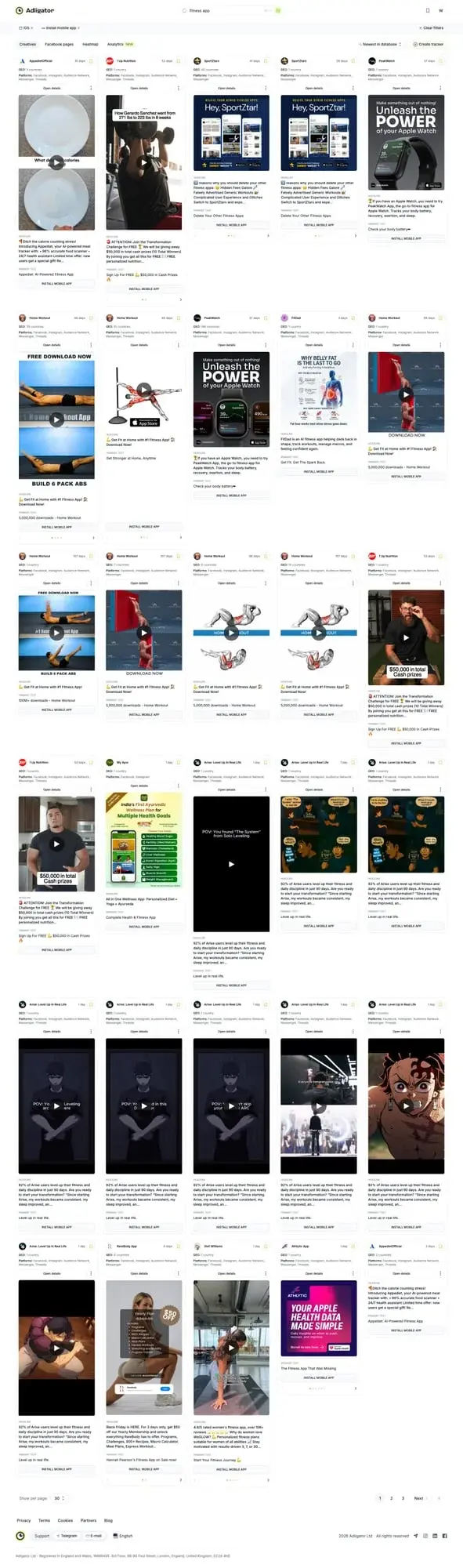 Using Adligator's OS and button type filters to isolate app install campaigns
Step 5: Analyze Destination URLs
Each ad card in Adligator shows the destination URL. For app install campaigns, this reveals:
- Whether they're linking to the App Store, Google Play, or a custom landing page
- If they're using a tracking link (AppsFlyer, Adjust, Branch) — indicating a sophisticated operation
- Whether they split traffic between direct app store links and web-based prelanders
Try Adligator free — spy on competitor app install ads and find winning creatives in minutes.
Creative Patterns in Winning App Install Ads
After analyzing hundreds of successful app install campaigns, clear patterns emerge. Understanding these patterns gives you a framework for creating your own creatives — and for identifying which competitor strategies to emulate.
 Creative patterns that dominate mobile app install advertising on Facebook
Pattern 1: UI Demo Videos (15-30 seconds)
The most common format for successful app install ads. Shows the actual app interface with someone interacting with it. Works because it answers the user's primary question: "What does this app actually look like and do?"
Key characteristics:
- First 3 seconds show the core value proposition
- Screen recordings with smooth transitions
- Minimal text overlay — let the UI speak
- Sound-off optimized (works without audio)
- Usually 15-30 seconds total length
Best for: productivity apps, fintech, social media, utilities.
Pattern 2: Problem-Solution Storytelling
Opens with a relatable pain point, then shows the app as the solution. More emotionally engaging than a pure UI demo.
Key characteristics:
- Opens with the problem (real-life scenario, not the app)
- Transition to "there's a better way" moment
- App UI appears as the solution
- Ends with clear outcome + CTA
Best for: health/fitness, language learning, finance management, dating.
Pattern 3: Social Proof Heavy
Leads with download numbers, ratings, user testimonials, or media mentions. Works when the app already has traction and the barrier to download is trust, not awareness.
Key characteristics:
- Opens with "10M+ downloads" or "4.8★ rating"
- Real user quotes or review screenshots
- "As featured in..." media logos
- Community size emphasis
Best for: established apps competing against incumbents, apps in trust-sensitive categories (finance, health).
Pattern 4: Feature Comparison
Directly compares the app against the default solution (e.g., stock camera vs. editing app, default calculator vs. finance app). Effective because it creates a clear upgrade narrative.
Key characteristics:
- Split-screen showing before/after or old way/new way
- Specific feature callouts
- Often uses text overlays for quick comparison
- Works as both video and carousel
Best for: photo/video editors, productivity tools, alternative keyboard/utility apps.
Pattern 5: UGC (User-Generated Content) Style
Filmed to look like organic content — someone talking to camera about why they love the app. Blends into the feed and bypasses ad blindness.
Key characteristics:
- Selfie-style video, natural lighting
- Authentic language (not scripted-sounding)
- Shows phone screen with the app
- Feels like a recommendation from a friend
Best for: lifestyle apps, gaming, social networking, subscription apps.
Building a Competitive Intelligence Workflow for App Install Campaigns
One-off spy sessions give you inspiration. A systematic workflow gives you a competitive edge. Here's how to build a repeatable process.
 Complete workflow for competitive app install ad intelligence
Weekly Monitoring Setup
- Identify your top 10 competitors. Include direct competitors (same category), indirect competitors (competing for same audience), and aspirational competitors (bigger players whose strategies you can learn from).
- Create saved searches in Adligator. Set up trackers for each competitor's Facebook page ID with OS and button type filters. Adligator Pro gives you 7 trackers, Team gives 14 — allocate them across your priority competitors.
- Schedule weekly reviews. Every Monday, check your trackers for new creatives. Look for:
- New creative formats being tested
- Changes in messaging or value proposition
- New geo targeting (new countries appearing in their ads)
- Significant changes in ad volume (scaling up or down)
Analysis Framework
For each competitor creative you find interesting, document:
- Creative format: Video, image, carousel, or playable?
- Hook: What happens in the first 3 seconds?
- Value proposition: What benefit do they promise?
- Social proof: Downloads, ratings, testimonials, media mentions?
- CTA: Button text and destination (app store vs. landing page)?
- Longevity: How many days has it been running?
- Volume: How many ads use similar creative?
Turning Insights into Action
Competitive intelligence is only valuable if it changes what you do. Here's how to translate analysis into creative briefs:
- Identify gaps. If all competitors use UI demo videos but none use UGC-style content, that's an opportunity to differentiate.
- Steal angles, not creatives. Never copy a competitor's ad. Instead, take the strategic angle (e.g., "social proof heavy") and create your own version.
- Test proven formats first. If a competitor has been running a video-demo-style ad for 30+ days, start by testing a similar format for your app. The market has already validated the approach.
- Speed matters. When you spot a new creative trend among competitors, test your version within a week. First movers in creative trends often get the best CPAs.
Common Mistakes in App Install Ad Intelligence
Even with the right tools, poor analysis leads to poor decisions. Avoid these pitfalls:
- Copying creatives instead of strategies. Taking a competitor's exact hook or visual concept is plagiarism and often performs worse because it's not tailored to your app's unique strengths.
- Ignoring geo context. A creative that crushes in Southeast Asia may fail in the US. Always check which geos an ad targets before assuming it's a universal winner.
- Equating volume with quality. A competitor running 50 similar creatives isn't necessarily winning — they might be desperately testing because nothing works. Look for consistency over time, not raw volume.
- Forgetting about ad fatigue. Even winning creatives have a shelf life. If a competitor has been running the same ad for 60+ days, it may be losing effectiveness. Use it as inspiration but create fresh versions.
- Only analyzing winners. Studying ads that ran for just 1-3 days before being killed teaches you what doesn't work — equally valuable for avoiding wasted spend.
- Skipping the landing page. The creative is only half the story. Always visit the destination URL to understand the full funnel. Are they sending to the app store directly or through a prelander? The post-click experience matters as much as the ad itself.
Advanced Techniques for App Install Ad Research
Once you have the basics down, these advanced tactics will sharpen your competitive edge:
Track Creative Refresh Cycles
Monitor how often competitors change their creatives. Apps that refresh every 2-3 weeks likely have an aggressive testing culture. Apps that run the same creative for months are either very profitable or very lazy. This information helps you calibrate your own testing cadence.
Analyze Cross-Platform Patterns
Many app marketers run similar creatives across Facebook, Instagram, and Audience Network. In Adligator, filter by platform to see if a competitor customizes creatives per placement or runs the same creative everywhere. Custom creatives per placement usually indicate a more sophisticated operation.
Reverse-Engineer Targeting Through Geo and Language
Adligator's GEO filter reveals which countries a competitor targets. Combined with the text language filter, you can see their localization strategy: are they running English-only globally, or do they have localized creatives for each market? This intelligence helps you identify underserved markets where competition might be lower.
Monitor Seasonal Patterns
Some app categories have strong seasonality (fitness in January, tax apps in March-April, shopping apps around Black Friday). Track how competitors adjust their creatives and spending around seasonal peaks. Plan your own calendar accordingly.
Build a Creative Swipe File
Maintain a running document of the best competitor creatives you find. Organize by:
- Format type (video demo, UGC, social proof, comparison)
- Vertical (fitness, finance, gaming, social)
- Hook type (problem statement, statistic, question, bold claim)
- Performance indicator (days running, number of similar ads)
Review this file before every creative brainstorm session. Over time, it becomes your most valuable strategic asset — a curated library of proven approaches specific to your market.
Use Ad Volume as a Budget Indicator
When a competitor suddenly increases their ad volume — going from 5 active creatives to 20 in a week — it signals they found something that works and are scaling aggressively. Conversely, a sudden drop in ad volume suggests they hit performance issues or budget constraints. Tracking these patterns over time reveals competitor budget cycles and strategic priorities.
Cross-Reference with App Store Data
Combine your Facebook ad intelligence with app store analytics (Sensor Tower, App Annie, data.ai). When you spot a competitor scaling their Facebook campaigns, check if their app store ranking is climbing simultaneously. This correlation confirms the campaigns are working and gives you a benchmark for the download volume those creative strategies can produce.
FAQ
Can I see competitor app install ads on Facebook Ad Library?
Yes, but with severe limitations. Facebook Ad Library shows all active ads but has no filters for OS, app store, or ad format. You'll need to manually scroll through thousands of ads to find app install campaigns. Spy tools like Adligator let you filter by OS (iOS/Android), button type (Install Mobile App), and display format to isolate app campaigns instantly.
What makes a winning app install creative on Facebook?
The best app install creatives share common traits: they show the app UI in action (not just the icon), use video to demonstrate core features in under 15 seconds, include social proof (download counts, ratings), and have a clear value proposition in the first 3 seconds. Testing multiple creative angles — feature demo, problem-solution, social proof — is essential.
How do I know which competitor app ads are actually profitable?
Look for longevity signals: ads running for 10+ days are likely profitable (advertisers don't keep spending on losing campaigns). In Adligator, filter by "Days active" to find long-running campaigns. Also check if the same advertiser runs multiple similar creatives — that indicates they're scaling a winning concept.
Conclusion
Spying on competitor app install campaigns isn't about copying — it's about understanding what the market responds to and using those insights to inform your own creative strategy. The mobile app advertising landscape on Facebook moves fast, and systematic competitive intelligence is the difference between reacting to trends and anticipating them.
Start with the workflow: identify competitors, set up monitoring, analyze creative patterns weekly, and translate insights into fresh creative briefs. The tools exist to make this process efficient — the competitive advantage comes from actually doing it consistently.
The marketers who win in mobile app advertising aren't necessarily the most creative — they're the most informed. They know what's working in the market before they spend a dollar on testing, and they iterate faster because they're building on proven concepts rather than guessing from scratch.
Ready to analyze competitor app install campaigns? Try Adligator free — filter by OS, button type, and format to find winning mobile app ads instantly.
Related Reading
- How to Use Ad Spy Tools for Affiliate Marketing: Finding Profitable Angles and Offers in 2026
- Anstrex vs PowerAdSpy vs Adligator: Which Is Best for Performance Marketers?
- BigSpy vs AdSpy vs PowerAdSpy: Which Ad Intelligence Tool Fits Your Workflow?
- Facebook Ad Spy for SaaS and B2B: How to Research Competitor Campaigns Beyond Ecommerce
