
Meta Ad Library vs Ad Spy Tools: When Free Isn't Enough for Competitive Intelligence
Every media buyer starts with the Meta Ad Library. It's free, official, and shows every active ad on Facebook, Instagram, Messenger, and Audience Network. For a quick competitor check, it works.
But there's a moment — usually around week three of serious competitive research — where the Meta Ad Library stops being helpful and starts being frustrating. You can't filter by how long an ad's been running. You can't compare across competitors. You can't set up alerts. You can't tell winners from tests.
This article breaks down exactly where the Meta Ad Library vs ad spy tools comparison stands in 2026. Not to convince you to pay for something you don't need — but to help you recognize when free stops being enough and what the upgrade actually gives you.
What Meta Ad Library Actually Gives You (And What It Doesn't)
Let's give Meta Ad Library its due. It's a powerful transparency tool with real strengths:
What it does well:
- Shows every active ad from any advertiser on Meta platforms
- Free and unlimited — no daily search limits
- Official data directly from Meta (not scraped)
- Searchable by advertiser name, keyword, or page
- Shows ad creative, copy, CTA button, and platform placement
- Provides a "started running" date
- Political ad transparency with spending data
- Available in every country
What it was designed for:
The Meta Ad Library was built for transparency and accountability — primarily around political advertising. It was not designed as a competitive intelligence tool for media buyers. This matters because every limitation stems from this design intent.
Meta has no incentive to make it easy for advertisers to spy on each other. The Ad Library exists because regulators required it, not because Meta wants to help you analyze competitors. Understanding this explains why certain obvious features (like filtering by run duration) are deliberately absent.
The 7 Critical Limitations of Meta Ad Library for Serious Media Buyers
These aren't minor inconveniences. Each one creates a specific workflow bottleneck that compounds when you're doing competitive research at scale.
1. No Run Duration Filter
You can see when an ad started running, but you can't filter or sort by it. This means you can't quickly surface ads that have been running for 14+ days — the strongest public signal that an ad is profitable. Every ad is mixed together: day-one tests alongside 90-day proven winners. You have to manually calculate run duration for each ad.
2. No Engagement or Performance Data
No likes, shares, comments, or any metric that indicates how an ad performs. You see the creative, but you have zero signal about audience response. You're evaluating ads purely on creative quality with no performance context.
3. Single-Country Filtering Only
You can filter by one country at a time. Comparing a competitor's ads across 10 countries means 10 separate searches, 10 sets of results to mentally cross-reference, and no way to see which ads run across multiple GEOs simultaneously.
4. No Saved Searches or Alerts
Every research session starts from scratch. You can't save a search, create a monitor, or set up alerts for new ads matching your criteria. There's no way to track changes over time without manually checking and recording.
5. No Historical Data
When an ad stops running, it disappears. You can't research what a competitor ran last quarter, analyze seasonal creative patterns, or track creative evolution over time. Your research window is limited to currently active ads.
6. No Format, CTA, or Language Filtering
You can't filter by video vs. image vs. carousel. You can't isolate ads using "Shop Now" vs. "Learn More" CTAs. You can't filter by ad copy language. These filters are critical for finding relevant creatives efficiently in large result sets.
7. No Cross-Competitor Analysis
Each search is per-advertiser or per-keyword. There's no way to compare multiple competitors side by side, identify which brands are running the most ads in a category, or spot trends across your competitive landscape.
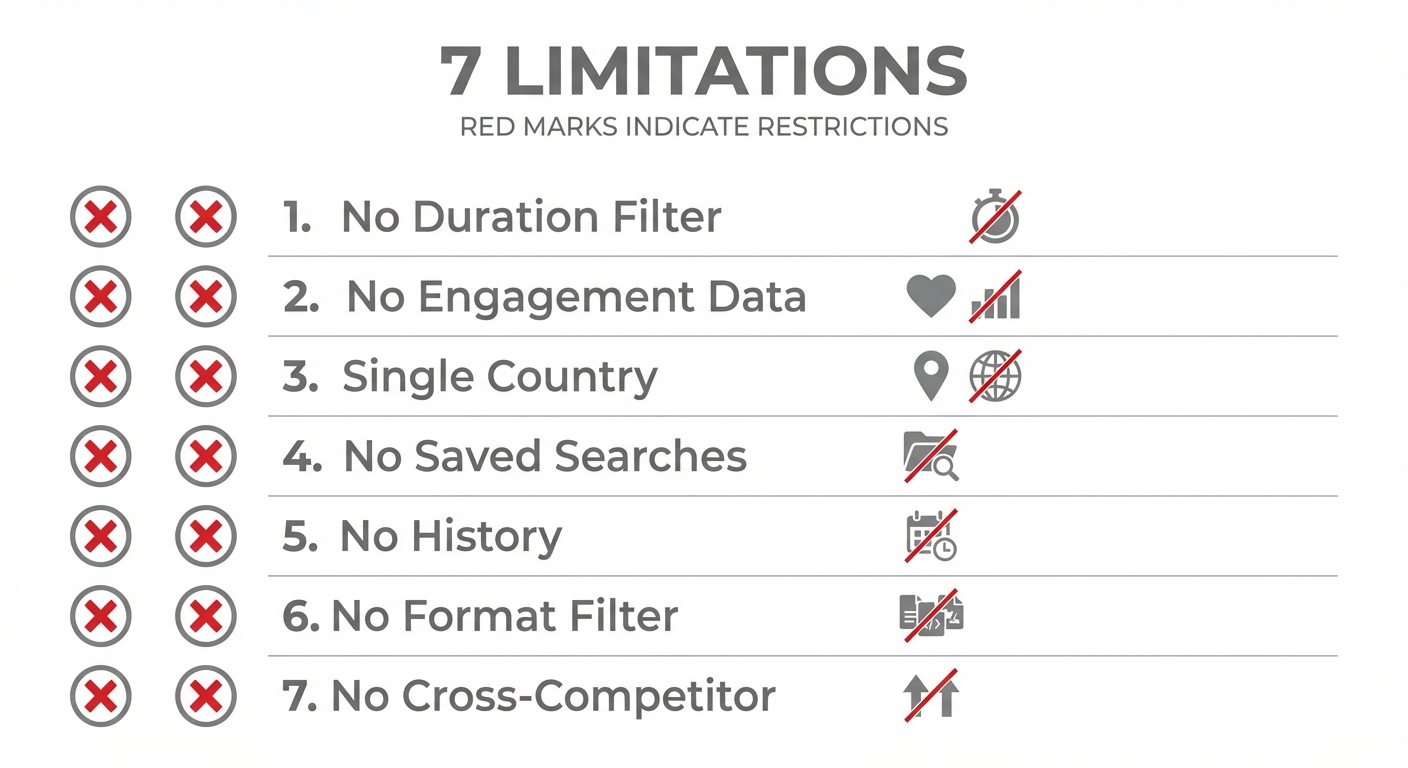 Meta Ad Library is comprehensive but lacks the filtering and tracking features serious media buyers need.
Want to see what Ad Library can't show you? Try Adligator free
What Ad Spy Tools Add on Top of the Free Library
Paid ad spy tools don't replace the Meta Ad Library — they layer intelligence on top of the same underlying ad data. Here's what they add:
Run duration filtering. Filter to show only ads running for 14+, 30+, or 60+ days. Instantly separates proven winners from tests and failures.
GEO count and multi-country filtering. See how many countries each ad targets. Filter by specific countries or set a minimum GEO count. Compare a competitor's ads across markets in one search.
Format and CTA filtering. Isolate video ads, carousels, or static images. Filter by CTA button type. Find ads using specific display formats.
Language filtering. Find ads in specific languages regardless of the GEO they target. Useful for multilingual markets and localization research.
Historical data. See ads that have stopped running. Analyze what competitors tested and killed. Track creative evolution over weeks and months.
Saved searches and alerts. Save filtered searches as persistent monitors. Get notified when new ads match your criteria. Build ongoing competitive intelligence without daily manual checks.
Collections and organization. Bookmark interesting ads into organized collections. Share findings with team members. Build searchable swipe files.
Cross-competitor analysis. Compare multiple advertisers in the same search. Identify category trends, dominant creative formats, and competitive density.
Head-to-Head: Meta Ad Library vs Paid Spy Tools (Feature Comparison Table)
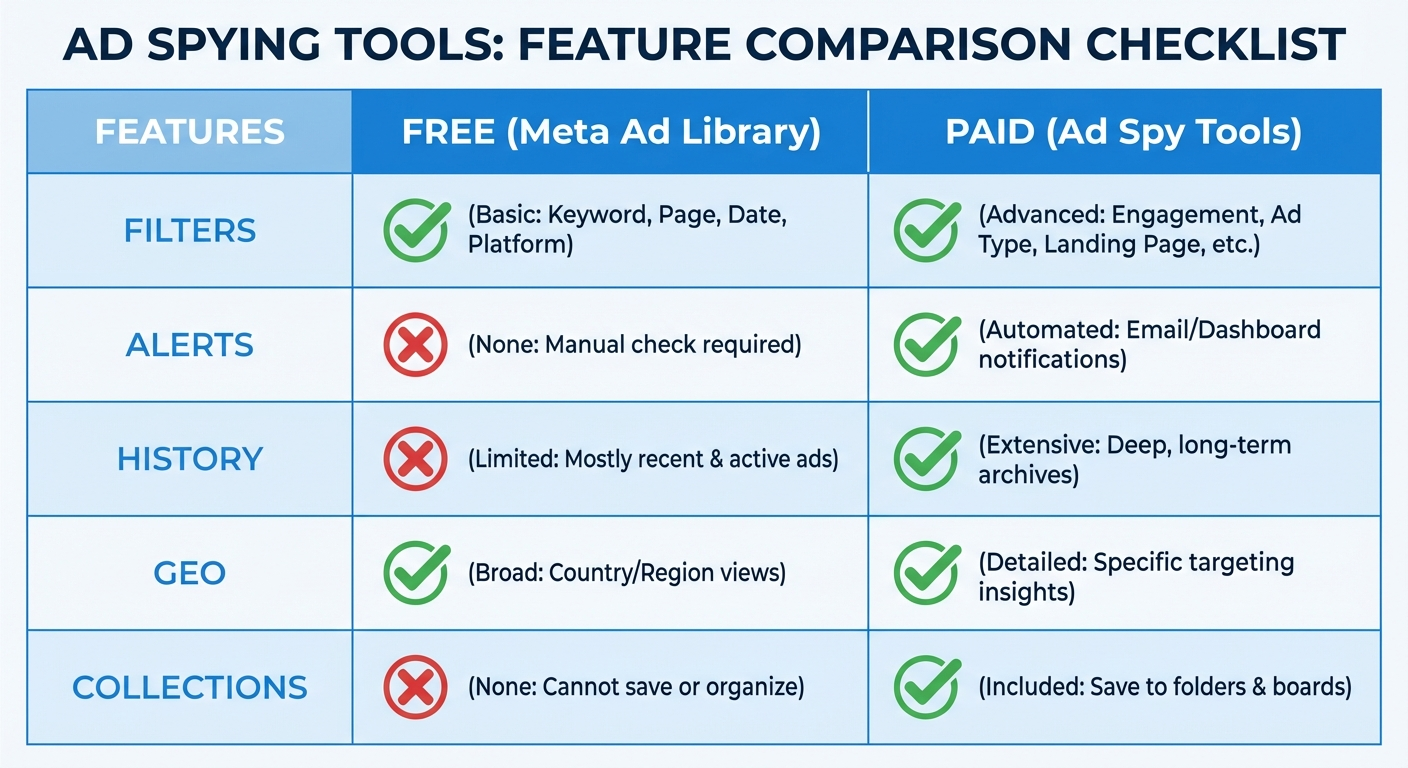 Head-to-head comparison: where free falls short and where paid tools add value.
| Feature | Meta Ad Library | Adligator | AdSpy | BigSpy |
|---|---|---|---|---|
| Price | Free | $0–65/mo | $149/mo | $0–99/mo |
| All active ads | ✅ | ✅ | ✅ | ✅ |
| Run duration filter | ❌ | ✅ | ✅ | Limited |
| GEO count per ad | ❌ | ✅ | ❌ | ❌ |
| Multi-country filter | ❌ (one at a time) | ✅ (234 countries) | ✅ (80+) | ✅ (60+) |
| Format filter | ❌ | ✅ | ✅ | ✅ |
| CTA filter | ❌ | ✅ | Limited | Limited |
| Language filter | ❌ | ✅ | ✅ | Limited |
| Saved searches/alerts | ❌ | ✅ (trackers) | ❌ | ❌ |
| Historical data | ❌ | Partial | ✅ | ✅ |
| Collections | ❌ | ✅ | Bookmarks | Bookmarks |
| Search limit | Unlimited | 5–300/day | Unlimited | 3–unlimited |
Try Adligator free — see what Meta Ad Library can't show you
The Hidden Cost of "Free"
The Meta Ad Library costs $0. But free has a price — it's measured in time and missed opportunities.
Time cost calculation:
A typical competitive research session using only the Meta Ad Library:
- Searching 5 competitors × 3 countries = 15 individual searches
- Each search takes 5–8 minutes of scrolling and evaluation
- Total: 75–120 minutes per session
- Weekly sessions × 4 weeks = 5–8 hours per month
The same research in a filtered spy tool:
- 5 competitors × 1 filtered search with multi-GEO = 5 searches
- Each search takes 3–5 minutes with filters pre-selecting relevant results
- Total: 15–25 minutes per session
- Weekly sessions × 4 weeks = 1–2 hours per month
The difference: 3–6 hours per month. At a media buyer's hourly rate of $50–100, that's $150–600 in time savings — more than the cost of any spy tool subscription.
Opportunity cost:
Beyond time, the Ad Library's lack of filtering means you miss signals that cost real money:
- You don't see which ads have been running 30+ days (proven winners)
- You can't spot cross-GEO patterns that reveal emerging trends
- You have no alert system, so you discover competitor moves days or weeks late
- You can't efficiently separate winning creatives from tests
These missed signals translate to slower creative iteration, longer testing cycles, and more wasted ad spend.
When the Free Library Is All You Need
Don't pay for a spy tool if you don't need one. The Meta Ad Library is sufficient when:
- You check competitors occasionally (1–2 times per month, not weekly)
- You track 1–2 competitors in a single GEO
- You use it for ad format inspiration rather than systematic competitor monitoring
- You're just starting out and need to understand what's running before investing in tools
- You run a local business where competitive density is low and creative iteration is slow
- Your ad budget is under $500/month — at this spend level, the time savings from a spy tool may not justify the cost
At these scales, the Meta Ad Library's limitations don't create meaningful workflow bottlenecks.
When You Need to Upgrade to a Paid Ad Spy Tool
The upgrade becomes worth it when any of these apply:
- You monitor 3+ competitors weekly. Manual Ad Library research becomes a time sink at this scale.
- You spend $2,000+ monthly on ads. A $32–149/month spy tool pays for itself if it saves you even one failed creative test per month.
- You need to identify winning ads. Without run duration filtering, you're guessing which ads perform well. That costs testing budget.
- You operate in multiple GEOs. Cross-country research in Ad Library is impractical.
- You run an agency. Multi-client competitive intelligence requires monitoring at a scale that demands automation.
- You work in competitive verticals. E-commerce, dropshipping, lead gen, and gaming verticals move fast. Being 48 hours late to a creative trend costs real money.
- Your team needs shared intelligence. Collections, saved searches, and exportable data enable team collaboration that Ad Library can't support.
How to Build a Competitive Intelligence Workflow Combining Both
The best workflow uses both tools, each for what it does best.
Meta Ad Library (daily, 5 minutes):
- Quick check on a specific competitor's newest ads
- Verify if an ad you spotted is still active
- Look up an advertiser by page name for initial recon
Ad Spy Tool (weekly, 30–60 minutes):
- Filtered search: your niche keyword + 14+ days active + target GEO
- Review live trackers for new matching creatives
- Compare competitor creative approaches across formats and GEOs
- Update your swipe file with new winners
- Brief creative team on emerging trends
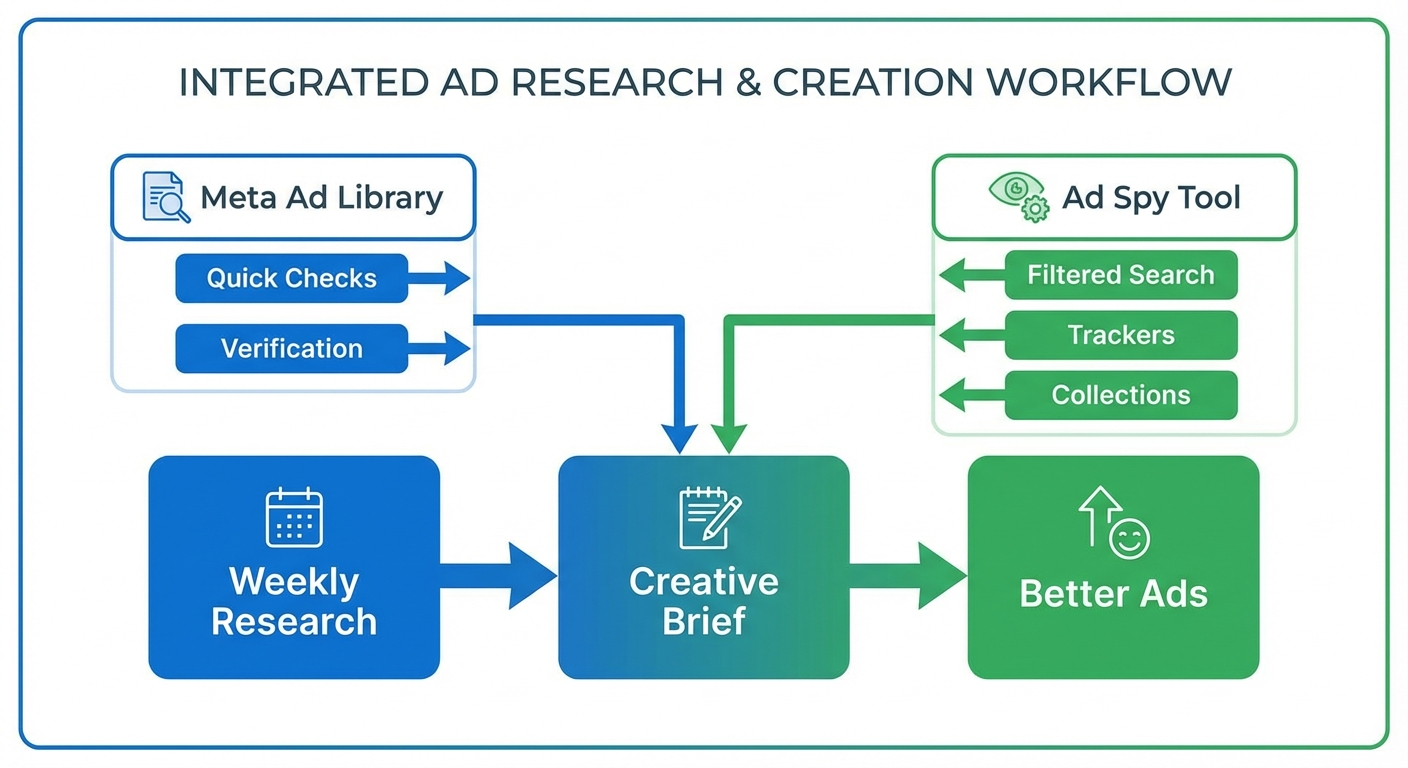 The optimal workflow uses Ad Library for quick checks and Adligator for systematic monitoring.
Monthly competitive review (60–90 minutes):
- Analyze which competitor creatives from last month are still running (validated winners)
- Identify new advertisers entering your space
- Track format and messaging trends across your vertical
- Update your competitive positioning based on what you've learned
This combined approach gives you the breadth of the free library and the depth of paid filtering — without overpaying for capabilities you don't use.
Tips for maximizing both tools:
- Use Ad Library to verify. When a spy tool surfaces an interesting ad, cross-reference it in Ad Library to confirm it's still active and see its exact start date.
- Use the spy tool to discover. Let filtered searches and trackers surface candidates. Don't try to "discover" through unfiltered Ad Library browsing.
- Batch your research. Don't check competitors every day. One focused 45-minute session per week with a spy tool replaces five unfocused daily Ad Library sessions.
- Document everything. Neither tool tracks your analysis for you. Maintain a simple spreadsheet or Notion database linking competitor ads to insights and actions taken.
Why Adligator Bridges the Gap Better Than Most Spy Tools
If the Meta Ad Library is your starting point, Adligator is the most natural upgrade for three reasons:
1. Same ecosystem, deeper filters. Adligator covers exactly what Ad Library covers (Facebook, Instagram, Messenger, Audience Network, Threads) but adds the filtering layer that Ad Library lacks. You're not paying for TikTok or native ad data you don't need.
2. Free tier to evaluate. Most spy tools require a paid subscription to test. Adligator's free tier (5 searches/day) lets you experience the difference between Ad Library and filtered research before spending anything.
3. Price-to-value ratio. At $32/month for 100 daily searches with full filtering, Adligator costs less than a single failed ad creative test. If it helps you find one winning angle per month, it's the highest-ROI tool in your stack.
4. Live trackers replace manual monitoring. Set up 7–14 trackers (depending on plan) and stop doing repetitive manual searches. The tool monitors for you and surfaces new matching creatives automatically.
Try Adligator free — see what Meta Ad Library can't show you
FAQ
Is Meta Ad Library enough for competitive research?
For basic, occasional competitor checks — yes. For systematic competitive intelligence involving multiple competitors, GEO analysis, creative trend tracking, and winner identification — no. The lack of run duration filtering, alerts, and cross-competitor analysis makes it impractical for professional use at scale.
What can ad spy tools show that Meta Ad Library can't?
Ad spy tools add run duration filtering (to identify winners), GEO count data, cross-competitor search, saved search alerts, historical data, format/CTA/language filtering, and collections for organizing insights. These features turn ad research from a manual task into a systematic workflow that compounds over time.
Is it worth paying for an ad spy tool when Ad Library is free?
If you spend $1,000+ monthly on ads, a $32–149/month spy tool that helps you find one winning creative angle per month easily delivers 10x ROI through reduced testing costs and faster creative iteration. The free option costs more in time and missed opportunities than most media buyers realize.
Conclusion
The Meta Ad Library vs ad spy tools debate isn't about free vs. paid. It's about whether your competitive intelligence needs have outgrown what a transparency tool was designed to provide.
For quick checks and occasional research, the Meta Ad Library is perfect. For systematic competitor monitoring, winner identification, multi-GEO analysis, and team-based creative intelligence — you need the filtering, tracking, and organization features that only paid tools provide.
Start free. When you hit the wall — and if you're reading this article, you probably already have — test a paid tool's free tier before committing. The gap between "I looked at some competitor ads" and "I have a systematic competitive intelligence workflow" is where the ROI lives. Most media buyers who make the switch report that the time savings alone justify the cost within the first week — and the creative insights that follow are what make it transformative.
Ready to see what's beyond the Ad Library? Try Adligator free
Related Reading
- Best AdSpy Alternatives for Meta Ad Intelligence in 2026
- How to Use Ad Spy Tools for Affiliate Marketing: Finding Profitable Angles and Offers in 2026
- How to Use Ad Spy Tools for Affiliate Marketing: Find Winning Facebook Offers Before Your Competition
- BigSpy vs AdSpy vs PowerAdSpy: Which Ad Intelligence Tool Fits Your Workflow?
