
Meta Advantage+ Shopping Campaigns: Complete Setup and Optimization Guide for eCommerce
Meta Advantage+ shopping campaigns have fundamentally changed how eCommerce advertisers run Facebook and Instagram ads. Instead of manually building separate prospecting and retargeting campaigns, configuring audiences, and split-testing creatives one at a time, Advantage+ consolidates everything into a single AI-driven campaign that tests up to 150 creative combinations automatically.
For media buyers spending $10K or more per month on Meta, the efficiency gains are significant: setup time drops from hours to minutes, and Meta's algorithm handles audience expansion, placement optimization, and creative rotation without constant manual intervention.
This guide covers everything you need to launch, optimize, and scale Meta Advantage+ shopping campaigns in 2026 — from initial setup and the critical existing customer budget cap to creative strategy, the learning phase, and when to intervene. We also cover how to use competitive intelligence to inform your creative decisions before you spend a dollar on testing.
What Are Meta Advantage+ Shopping Campaigns
Meta Advantage+ shopping campaigns (ASC) are an AI-powered campaign type designed specifically for eCommerce advertisers optimizing toward purchase conversions. Launched originally in 2022 and significantly upgraded through 2025-2026, ASC uses Meta's machine learning to automate the core decisions that media buyers traditionally handle manually.
Here is what Advantage+ automates:
- Audience targeting — combines prospecting and retargeting into a single campaign, letting the algorithm decide who to show ads to based on conversion probability
- Placement optimization — distributes ads across Facebook Feed, Instagram Feed, Stories, Reels, Messenger, and Audience Network based on where conversions are cheapest
- Creative testing — tests up to 150 creative combinations simultaneously, rotating budget toward top performers
- Budget allocation — shifts spend between new and existing customers dynamically (within your defined cap)
 Advantage+ Shopping consolidates prospecting, retargeting, and creative testing into a single automated campaign structure.
The key difference from standard Meta campaigns: you give up granular audience control in exchange for algorithmic efficiency. There are no custom audiences, no lookalikes, no interest targeting. You set a budget, upload creatives, define your existing customer cap, and let Meta's AI find buyers.
This trade-off works well for accounts with strong pixel data, sufficient budget, and a high volume of creative assets. It works poorly for advertisers who need tight audience control, have limited budgets, or sell niche products with small addressable markets.
Who Should Use Advantage+ Shopping Campaigns
Not every eCommerce business benefits from Advantage+ shopping campaigns. The algorithm needs data, budget, and creative volume to outperform manual campaigns. Here is a practical breakdown:
Good Candidates for Advantage+
- Monthly ad spend above $10K — the algorithm needs budget headroom to test and optimize across 150 creative combinations
- Strong product catalog with 20+ SKUs and complete product data (titles, descriptions, images)
- Consistent creative pipeline producing 10+ new assets per month
- Clear purchase conversion goal — Advantage+ is optimized for bottom-funnel events, not awareness or engagement
- Healthy pixel data — at least 100 monthly purchase events for the algorithm to learn effectively
When to Stay Manual
- Monthly spend under $5K — insufficient budget for the algorithm to exit the learning phase reliably
- Fewer than 10 creative assets — Advantage+ cannot optimize creative rotation with limited variety
- Niche or B2B products where the addressable audience is small and specific targeting matters
- New pixel with fewer than 50 monthly conversions — the algorithm lacks signal to optimize effectively
- Need for strict audience segmentation — testing specific demographics, interests, or geographic segments
The Hybrid Approach
Most sophisticated advertisers run both. A common structure allocates 60-70% of total budget to Advantage+ for broad prospecting and automated retargeting, 20-30% to manual prospecting campaigns for specific audience testing, and 10-20% to manual retargeting for dynamic product ads (DPA) and custom remarketing sequences.
This gives you the efficiency of automation for your core spend while maintaining manual control for strategic testing and high-intent retargeting.
How to Set Up an Advantage+ Shopping Campaign Step by Step
Setting up an Advantage+ shopping campaign takes about 10 minutes — significantly less than the 1-2 hours required for a comparable manual campaign structure. Here is the exact process:
Step 1: Create the Campaign
Open Meta Ads Manager and click "Create." Select Sales as your campaign objective. On the next screen, choose Advantage+ shopping campaign as the campaign type.
Meta will automatically apply its recommended settings for placements and audience. Unlike standard campaigns, you will not see detailed audience targeting options — that is by design.
Step 2: Configure Your Budget
Set either a daily or lifetime budget. Meta recommends a minimum of $50 per day to exit the learning phase within 7 days. Lower budgets extend the learning period and may prevent the campaign from accumulating the 50 conversions needed to optimize.
For accounts spending $10K+ monthly, allocating $200-500/day to your primary Advantage+ campaign is common.
Step 3: Set the Existing Customer Budget Cap
This is the single most important setting in Advantage+ shopping campaigns, and the one most advertisers get wrong.
The existing customer budget cap controls what percentage of your budget can be spent on people who have already purchased from you. Without a cap, the algorithm tends to over-index on retargeting existing customers because they convert more easily — inflating your ROAS numbers while limiting new customer acquisition.
Here is how different cap levels affect performance:
- 0% — pure prospecting, no retargeting spend (aggressive growth mode)
- 10-20% — mostly prospecting with light retargeting
- 25-30% — balanced approach (recommended starting point)
- 40-50% — heavy retargeting emphasis
- No cap — algorithm decides freely (risky, often leads to excessive retargeting)
Start at 25-30% and adjust based on your new-vs-existing customer acquisition costs over the first 2-3 weeks.
Step 4: Upload Creative Assets
Upload a minimum of 10 creative assets — but 20-50 is the recommended range for Advantage+ to work effectively. The system can test up to 150 combinations, so more variety gives the algorithm more room to find winners.
Mix formats: single images (40% of assets), short videos of 6-15 seconds (30%), carousels (20%), and collection ads (10%).
Step 5: Connect Your Product Catalog
If you run a Shopify, WooCommerce, or other eCommerce store, connect your product catalog to enable dynamic product ads within the Advantage+ campaign. Enable dynamic creative optimization and configure product sets if you want to promote specific categories.
Step 6: Launch and Wait
Hit publish and resist the urge to change anything for at least 7 days. The learning phase is critical — any edits reset the 50-conversion threshold and force the algorithm to start over.
Creative Strategy That Fuels Advantage+ Performance
Creative is the single biggest lever in Advantage+ shopping campaigns. Since you cannot control audience targeting, the quality and variety of your creative assets directly determine performance. Meta's algorithm uses creative signals to identify high-potential audiences — better creative means better audience matching.
The Optimal Creative Mix
 The optimal creative mix balances authenticity (UGC) with conversion-focused formats (product demos and promotional content).
- UGC and testimonials (30-40%) — user-generated content builds trust and typically delivers the lowest CPA in eCommerce campaigns. Include unboxing videos, customer reviews, and before/after content.
- Product demonstrations (20-30%) — showcase features, functionality, and benefits. Close-up shots, 360-degree views, and "how it works" videos perform well.
- Lifestyle content (15-25%) — show your product in context. Aspirational imagery that helps the viewer imagine ownership.
- Promotional offers (10-20%) — limited-time discounts, bundle deals, and seasonal promotions. Use sparingly to avoid training the algorithm to rely on discounts.
Creative Refresh Cadence
Advantage+ campaigns are particularly sensitive to creative fatigue. Monitor these signals:
- Frequency exceeds 3 — your audience is seeing the same ads too often
- CTR drops 15%+ week-over-week — engagement is declining
- CPM increases 20%+ above baseline — Meta is struggling to find responsive audiences
Refresh schedule:
- Weekly — add minor variations (new headlines, different crops, color adjustments)
- Bi-weekly — introduce new creative concepts
- Monthly — full creative refresh with entirely new angles and formats
Want to see what creative strategies your competitors are running? Try Adligator Free — Spy on Competitor Shopping Ads
Optimization and Scaling: From Learning Phase to Profit
The biggest mistake with Advantage+ shopping campaigns is impatience. The algorithm needs time to learn, and premature changes destroy performance. Here is the timeline you should follow:
 Patience is critical — most Advantage+ campaigns need 4 weeks before aggressive scaling is safe.
Phase 1: Learning (Days 1-7)
The campaign needs approximately 50 conversions to exit the learning phase. During this period:
- Do not change budget, creative, or any settings
- Do not pause and restart the campaign
- Do not judge results based on the first 48 hours
- Do monitor delivery status daily to ensure the campaign is spending
Phase 2: Stabilization (Days 8-14)
After exiting the learning phase, performance metrics begin to stabilize. This is when you start gathering actionable data:
- Review ROAS by individual creative asset — identify your top 3-5 performers
- Check the new-vs-existing customer split against your cap setting
- Analyze placement performance across Feed, Reels, and Stories
- Note which creative formats (image vs video vs carousel) drive the best results
Phase 3: Optimization (Days 15-28)
Based on your stabilization data, make targeted adjustments:
- Add new creatives that mirror the style and format of your top performers
- Adjust the existing customer cap if the new/existing split does not match your goals
- Remove underperforming creatives that have spent significant budget with no conversions
- Keep budget changes small — no more than 10-15% in a single adjustment
Phase 4: Scaling (Day 29+)
Once you have 4 consecutive weeks of consistent ROAS at or above your target:
- Increase budget by a maximum of 20% per week
- Monitor CPA for 3-4 days after each increase
- Allow stabilization before the next increase
- Aggressive scaling (larger jumps) carries a 25-40% risk of temporary performance drops
Red Flags Requiring Immediate Intervention
- CPA exceeds target by 50%+ for 7 consecutive days
- Majority of spend routing to existing customers despite cap setting
- A single creative consuming more than 60% of total budget
- Delivery issues flagged in Ads Manager for 48+ hours
How to Spy on Competitor Shopping Creatives with Adligator
The biggest challenge with Advantage+ shopping campaigns is not the setup — it is knowing what creative to feed the algorithm. Since creative is the primary lever, understanding what works for competitors in your niche gives you a massive head start.
This is where competitive ad intelligence becomes essential. Instead of guessing which creative angles to test, you can analyze what your competitors are already running, identify ads that have been active for weeks (a strong signal of profitability), and reverse-engineer the patterns.
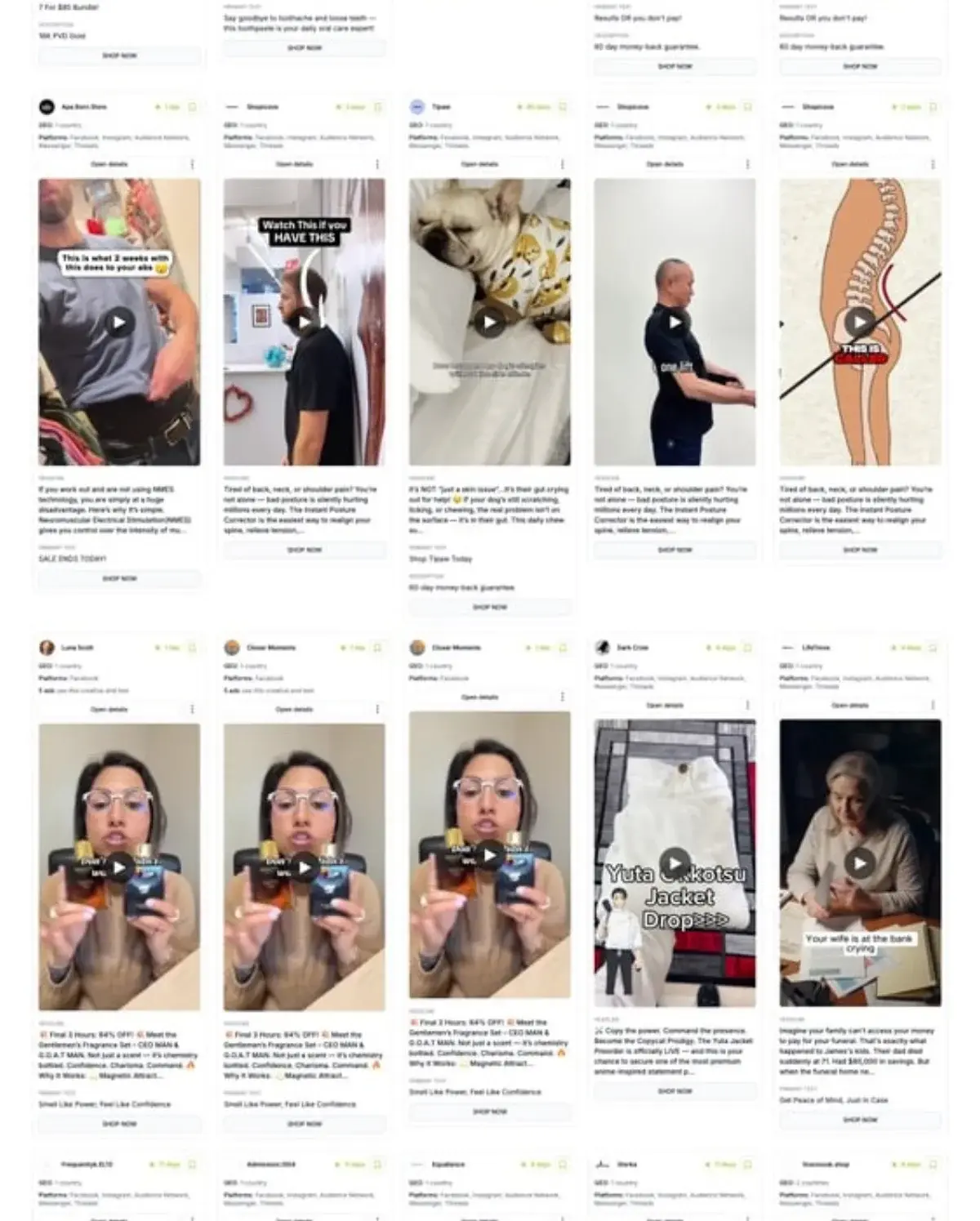 Adligator lets you filter competitor ads by CTA button type, making it easy to find shopping-focused creatives.
How to Use Adligator for Advantage+ Creative Research
- Search by competitor — enter a competitor's Facebook page ID to see all their active ads. Focus on ads running for 10+ days, which typically indicates positive ROAS.
- Filter by CTA button — use the "Shop Now" button filter to isolate purchase-intent creatives. This removes awareness and engagement ads from your results.
- Analyze by longevity — sort by days active to find the longest-running creatives. Ads that survive 30+ days are almost certainly profitable and worth studying.
- Study creative patterns — look for common elements across top-performing competitor ads: format (video vs image), style (UGC vs polished), offer structure (discount vs value proposition), and copy length.
- Track creative refresh cycles — monitor how often competitors update their creatives. This tells you the expected fatigue timeline for your niche.
- Filter by geo and language — if you are targeting specific markets, narrow your search to see what competitors run in those regions. Adligator supports 234 countries and 50+ languages.
Turning Competitor Intelligence into Advantage+ Creatives
The goal is not to copy competitor ads. Instead, use competitive intelligence to inform your creative strategy:
- If competitors heavily use UGC testimonials, ensure your creative mix includes strong UGC content
- If long-running competitor ads feature specific offer structures (free shipping, percentage discounts), test similar value propositions
- If competitors use video formats predominantly, prioritize video in your creative pipeline
- Identify gaps — if no competitor in your niche uses carousel formats or before/after comparisons, test those angles for differentiation
Common Mistakes That Kill Advantage+ Performance
Even experienced media buyers make mistakes with Advantage+ shopping campaigns. Here are the most frequent issues and how to fix them:
Mistake 1: No Existing Customer Cap
Without setting an existing customer budget cap, Meta's algorithm defaults to the easiest conversions — retargeting existing customers. Your ROAS looks great on paper, but you are not acquiring new customers. Always set a cap between 20-30% to start.
Mistake 2: Insufficient Creative Volume
Launching with fewer than 10 creatives limits the algorithm's ability to test and optimize. With only 3-5 assets, Advantage+ essentially becomes an expensive way to run a standard campaign. Aim for 20+ assets at launch.
Mistake 3: Editing During the Learning Phase
Every significant change — budget adjustment, new creative, paused creative — resets the learning phase. This forces the algorithm to reaccumulate 50 conversions from scratch, wasting budget and delaying optimization.
Mistake 4: Scaling Too Aggressively
Increasing budget by more than 20% in a single week destabilizes the algorithm. Performance drops sharply, and the campaign may re-enter a pseudo-learning phase. Scale gradually and monitor CPA after each adjustment.
Mistake 5: Ignoring Creative Fatigue
Advantage+ does not refresh your creative automatically. When frequency climbs above 3 and CTR declines, you need to add new assets. Build a production workflow that delivers fresh creative every 1-2 weeks.
Mistake 6: Running Advantage+ With Overlapping Manual Campaigns
If your manual campaigns target the same audiences as Advantage+, you are bidding against yourself in the auction. Either consolidate into Advantage+ or ensure your manual campaigns target distinct audience segments that do not overlap.
Mistake 7: Not Monitoring the New vs Existing Customer Split
Even with a cap set, check the actual split regularly. If your cap is 25% but existing customers are receiving 40% of spend, your customer list definition may need updating in the Ads Manager settings.
FAQ
What is the minimum budget for Advantage+ shopping campaigns?
Meta recommends at least $50 per day to exit the learning phase within 7 days. Campaigns with lower budgets take longer to optimize and may never accumulate the 50 conversions needed to complete the learning phase. For accounts spending $10K+ monthly, $200-500/day for the primary Advantage+ campaign is typical.
Can I run Advantage+ shopping campaigns alongside manual campaigns?
Yes. Many advertisers allocate 60-70% of budget to Advantage+ for broad prospecting, 20-30% to manual prospecting for specific audience testing, and 10-20% to manual retargeting for DPA and custom remarketing. The key is ensuring manual campaigns do not target overlapping audiences to avoid auction self-competition.
How many creatives do I need for Advantage+ shopping campaigns?
Start with a minimum of 10 creative assets. Meta recommends 20-50 for optimal performance, and the system can test up to 150 creative combinations simultaneously. Include a mix of UGC (30-40%), product demos (20-30%), lifestyle content (15-25%), and promotional offers (10-20%) across single image, video, carousel, and collection formats.
What is the existing customer budget cap and why does it matter?
The existing customer budget cap controls what percentage of your Advantage+ budget can be spent retargeting people who have already purchased. Without a cap, the algorithm tends to over-spend on existing customers because they convert easily. Start with a 25-30% cap and adjust based on your new customer acquisition goals.
How long does the Advantage+ learning phase take?
The learning phase typically takes 7 days and requires approximately 50 conversion events. During this period, avoid making any changes to the campaign — budget adjustments, creative additions, or setting changes all reset the learning threshold and force the algorithm to start over.
Conclusion
Meta Advantage+ shopping campaigns represent the most significant shift in eCommerce advertising since the iOS 14 privacy changes. For advertisers with sufficient budget ($10K+/month), strong creative pipelines, and healthy pixel data, Advantage+ delivers measurable efficiency gains: faster setup, automated optimization, and often superior ROAS compared to manual campaign structures.
The keys to success are straightforward: set an appropriate existing customer budget cap (start at 25-30%), feed the algorithm with 20+ diverse creative assets, respect the learning phase timeline, and scale gradually at no more than 20% per week.
The one area where Advantage+ cannot help is creative strategy. The algorithm optimizes what you give it — but deciding what to create in the first place requires competitive intelligence. Understanding what creative approaches work in your niche, which formats drive the longest ad lifespans, and where competitors leave gaps gives you a decisive advantage before the first dollar is spent.
Ready to see what shopping creatives your competitors are running? Try Adligator Free — Spy on Competitor Shopping Ads
Related Reading
- How Meta's Andromeda Algorithm Changes Ad Delivery in 2026: What Media Buyers Must Adapt
- Winning Meta Ads Don't Start in One Country: What 200-Country Blasts Reveal About How Evergreen Creatives Actually Scale
- Meta Advantage+ Shopping Campaigns vs Manual Setup: When to Use Each in 2026
- Meta Broad Targeting in 2026: Why Advantage+ Audiences Are Replacing Interest-Based Targeting
