
Programmatic Advertising Strategy: A Performance Marketer's Guide to DSPs and RTB
If you have been running Facebook and Google Ads for a while, you have probably noticed a pattern: CPMs creep upward, audiences saturate faster, and scaling becomes a game of diminishing returns. Programmatic advertising for marketers offers a way to break out of that ceiling.
But programmatic is not just "more ad inventory." It is an entirely different buying model with its own infrastructure, terminology, and strategic logic. This guide breaks down how DSPs, RTB, and programmatic buying work — and more importantly, when it actually makes sense for a performance marketer to add programmatic to the channel mix.
No hype. No jargon walls. Just the practical knowledge you need to make a smart decision about whether to expand beyond social ads in 2026.
What Is Programmatic Advertising and How It Differs from Social Ads
Programmatic advertising is the automated buying and selling of digital ad inventory through real-time auctions. Instead of negotiating directly with publishers (like the old media buying days), algorithms handle the bidding, placement, and optimization in milliseconds.
Here is what makes it fundamentally different from running ads on Meta or Google:
- Inventory scope. Social ads appear on one platform's properties. Programmatic lets you buy inventory across thousands of websites, apps, CTV devices, and audio platforms simultaneously.
- Buying mechanism. On Facebook, you set a budget and the platform's algorithm optimizes delivery within its walled garden. In programmatic, you use a DSP to bid on individual impressions across an open marketplace.
- Audience data. Social platforms rely on their own first-party data (interests, behaviors, lookalikes). Programmatic layers in third-party data segments, contextual signals, and your own first-party data through DMPs.
- Transparency. With programmatic, you can see exactly which sites and placements your ads appear on. Social platforms offer less placement-level granularity.
- Creative formats. Programmatic supports standard display (banners), native, video, CTV, audio, and DOOH (digital out-of-home). Social platforms primarily serve feed-based and story formats.
The key distinction: social ads optimize within one ecosystem. Programmatic advertising lets you reach audiences wherever they spend time online — but requires more infrastructure to do it well.
Key Components: DSPs, SSPs, DMPs, and Ad Exchanges
Before you can run a single programmatic campaign, you need to understand the core technology stack. Think of it as the plumbing behind every impression.
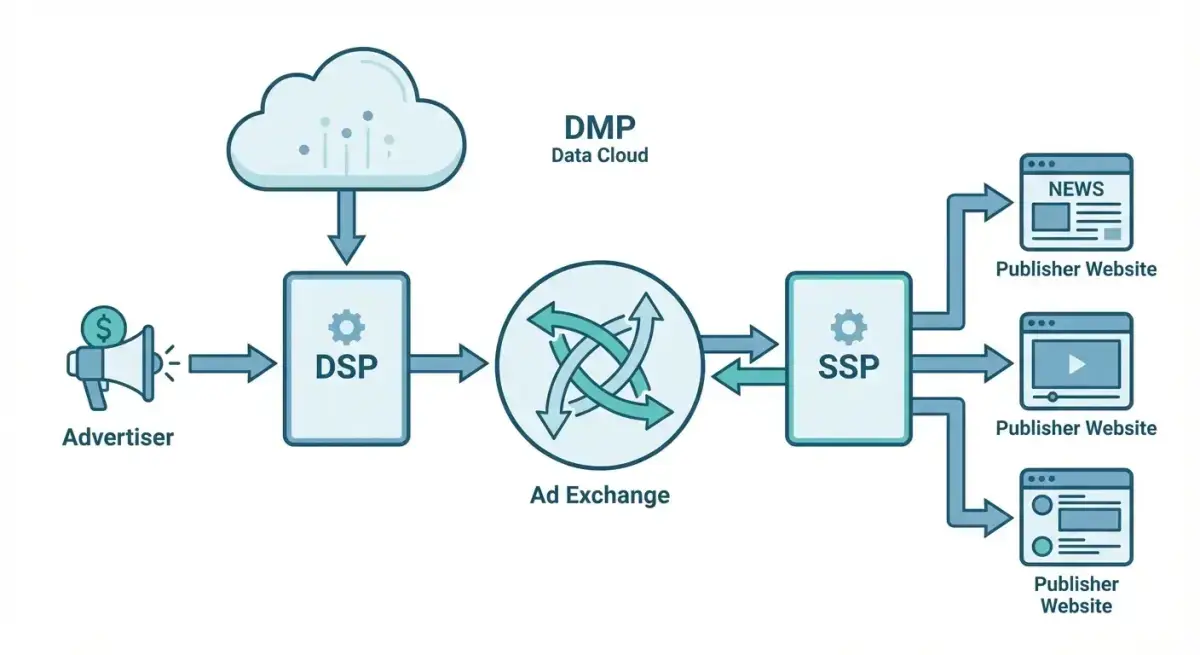 The programmatic advertising ecosystem: how DSPs, SSPs, and ad exchanges connect advertisers to publishers in real time
Demand-Side Platforms (DSPs)
A DSP is your control center. This is where you set up campaigns, define targeting, upload creatives, set bids, and monitor performance. Think of it as the Facebook Ads Manager equivalent for the open web.
DSPs connect to multiple ad exchanges and SSPs, giving you access to billions of impressions across the internet. Key functions include:
- Real-time bidding on individual impressions
- Audience targeting using first-party, third-party, and contextual data
- Frequency capping across sites and devices
- Campaign pacing and budget management
- Cross-device tracking and attribution
Supply-Side Platforms (SSPs)
SSPs sit on the publisher side. They help website owners, app developers, and content platforms sell their ad inventory to the highest bidder. Popular SSPs include Google Ad Manager, Magnite, and PubMatic.
As an advertiser, you rarely interact with SSPs directly, but understanding their role explains why inventory quality varies — different SSPs work with different publisher networks.
Data Management Platforms (DMPs)
DMPs collect, organize, and activate audience data. They pull in data from your CRM, website analytics, offline sources, and third-party providers, then package it into targetable segments.
In 2026, DMPs are evolving into CDPs (Customer Data Platforms) as the industry shifts toward first-party data strategies. If you are just starting with programmatic, focus on leveraging your own first-party data before purchasing third-party segments.
Ad Exchanges
Ad exchanges are the digital marketplaces where DSPs and SSPs meet. They facilitate the auction for each impression in real time. Major ad exchanges include Google Ad Exchange (AdX), OpenX, and Index Exchange.
Think of it like a stock exchange: sellers list inventory, buyers bid, and transactions happen in milliseconds.
Types of Programmatic Buying: RTB, PMP, Programmatic Direct
Not all programmatic buying works the same way. There are three primary models, each with different tradeoffs between price, quality, and control.
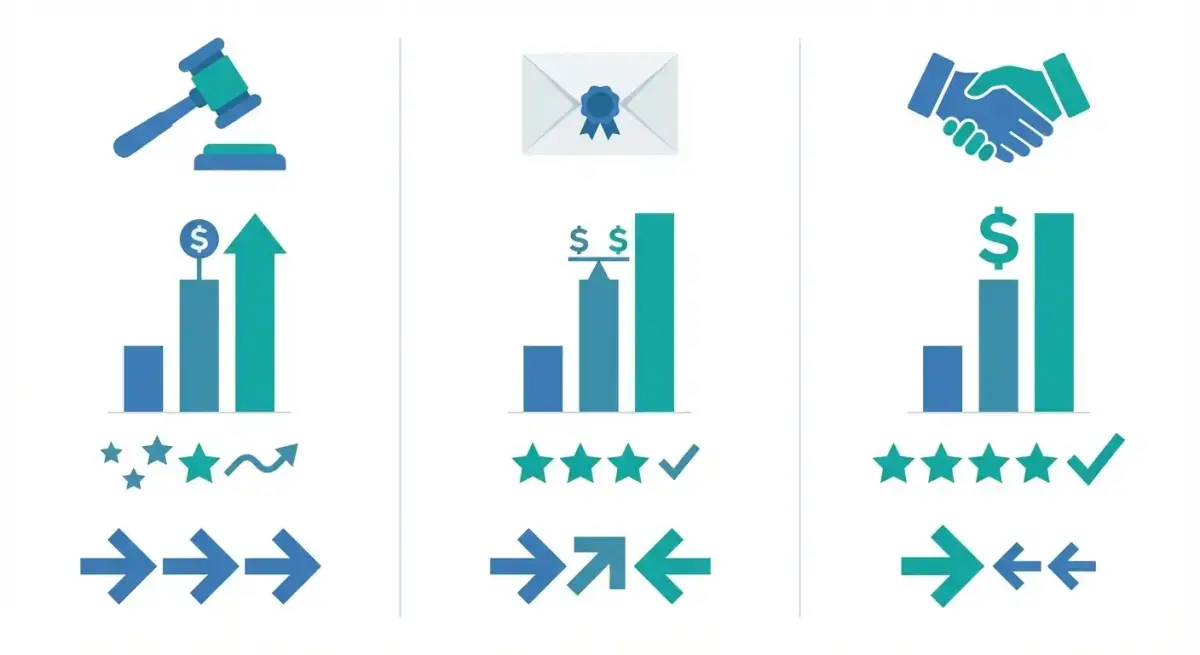 Three programmatic buying models compared: RTB, PMP, and Programmatic Direct
Real-Time Bidding (RTB) — Open Auction
RTB is the most common programmatic buying method. Every time a user loads a webpage with ad space, an auction fires in real time. Your DSP evaluates whether the impression matches your targeting criteria, calculates a bid, and competes against other advertisers.
Pros: Widest reach, lowest entry cost, maximum flexibility. Cons: Less control over placement quality, higher risk of ad fraud, variable CPMs.
Best for: Prospecting, broad awareness campaigns, and testing new audiences at scale.
Private Marketplace (PMP)
PMPs are invitation-only auctions where specific publishers offer premium inventory to a select group of advertisers. You still bid in real time, but the competition is limited and the inventory quality is guaranteed.
Pros: Better inventory quality, brand safety, direct publisher relationships. Cons: Higher CPMs, limited scale, requires minimum spend commitments.
Best for: Brand-conscious advertisers who need placement transparency and premium positioning.
Programmatic Direct (Guaranteed)
Programmatic direct eliminates the auction entirely. You negotiate a fixed price and guaranteed impressions directly with a publisher, but the transaction and delivery happen through programmatic pipes.
Pros: Guaranteed inventory, predictable costs, maximum brand safety. Cons: Highest CPMs, least flexibility, requires significant budget commitment.
Best for: Major brand campaigns, product launches, and high-stakes seasonal pushes.
Which Model Should You Start With?
If you are coming from social ads and testing programmatic for the first time, start with RTB on a self-serve DSP. It gives you the most flexibility to learn the ecosystem without committing large budgets upfront.
Top DSPs for Performance Marketers in 2026
Choosing the right DSP matters more than most marketers realize. Each platform has different strengths, inventory access, minimum spends, and learning curves.
Here are the DSPs most relevant for performance marketers expanding from social:
The Trade Desk — The industry standard for sophisticated programmatic buying. Excellent cross-device targeting, CTV access, and reporting. Minimum spend typically starts around $10,000/month. Best for agencies and teams with programmatic experience.
StackAdapt — A self-serve DSP popular with mid-market advertisers. Strong native and CTV inventory. Lower minimum spend ($1,000–$2,500/month). Intuitive interface that social media buyers find familiar.
DV360 (Google Display & Video 360) — Google's enterprise DSP with direct access to YouTube and Google Ad Exchange inventory. Powerful for teams already deep in the Google ecosystem. Requires a Google Marketing Platform contract.
Amazon DSP — Essential for e-commerce advertisers. Access to Amazon's first-party shopping data for targeting. Available both as self-serve and managed service.
MediaMath — Strong in data-driven optimization and advanced audience modeling. Good for performance marketers focused on lower-funnel outcomes.
Before expanding to programmatic, make sure you have fully optimized your social ad strategy. Use Adligator to benchmark your social ad performance before expanding to programmatic — understanding what works on Meta first gives you a stronger foundation for cross-channel growth.
Targeting Options in Programmatic vs Social
One of the biggest adjustments for social media buyers entering programmatic is the targeting paradigm shift.
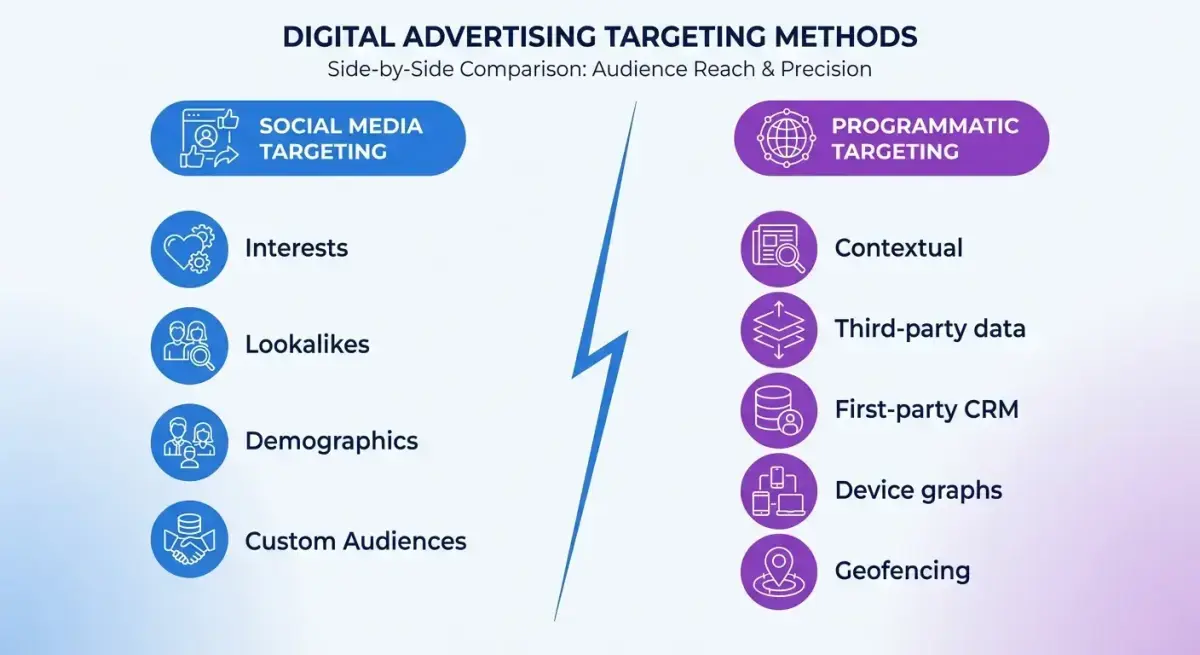 Programmatic vs social ads: targeting capabilities compared across key dimensions
Social Ad Targeting (Meta, TikTok, etc.)
- Interest and behavior-based (platform's own data)
- Lookalike audiences built from seed lists
- Demographic targeting (age, gender, location)
- Custom audiences from CRM uploads
- Engagement retargeting (video views, page interactions)
Programmatic Targeting
- Contextual targeting. Place ads on pages with content relevant to your product. No user data required — purely based on page content analysis.
- Third-party data segments. Purchase audience segments from data providers (e.g., Oracle Data Cloud, Lotame) based on browsing behavior, purchase intent, or demographic profiles.
- First-party data. Upload your CRM lists and website visitor data to target known prospects across the web.
- Device and IP targeting. Target specific devices, operating systems, or geographic areas down to ZIP code level.
- Cross-device graphs. Track and target users across their phones, tablets, desktops, and CTV devices using device graph technology.
- Geofencing. Target users who have visited specific physical locations (stores, events, competitor locations).
The Key Difference
Social platforms know who people are (identity-based). Programmatic knows what people do and where they go (behavior and context-based). The strongest strategies combine both — use social for intent-rich audiences and programmatic for cross-web reach and retargeting.
Creative Requirements and Formats
Programmatic creative production is a different workflow than social ads. Instead of designing for feeds and stories, you are designing for banner slots, native placements, and video players across diverse environments.
Standard Display Banners
The IAB standard sizes still dominate:
- 300×250 (medium rectangle) — the workhorse
- 728×90 (leaderboard) — desktop header placement
- 160×600 (wide skyscraper) — sidebar placement
- 320×50 (mobile banner) — mobile web
- 300×600 (half page) — high-impact desktop
For a basic campaign launch, prepare at least the top three sizes. Most DSPs support HTML5 rich media in addition to static images.
Native Ads
Native formats blend into the publisher's content feed. You provide a headline, description, image, and brand logo. The DSP automatically adapts the layout to match each publisher's design.
Native typically outperforms display banners for performance campaigns because it avoids banner blindness and feels less intrusive.
Video
Programmatic video comes in three flavors:
- Pre-roll — plays before content (YouTube-style)
- Mid-roll — plays during content
- Outstream — auto-plays within editorial content (no video player needed)
Standard specs: MP4, 15–30 seconds, 16:9 aspect ratio. CTV placements often require 30-second spots with higher production quality.
Connected TV (CTV)
CTV is the fastest-growing programmatic channel. Ads play on streaming services and smart TV apps. High completion rates (95%+) but limited interactivity. Think of it as digital TV advertising with programmatic targeting precision.
Dynamic Creative Optimization (DCO)
DCO is the programmatic equivalent of Facebook's dynamic creative testing. Instead of building static ads for every audience segment, you provide creative components — headlines, images, CTAs, product feeds — and the DSP assembles personalized ad variations in real time based on user data and context.
DCO works particularly well for:
- E-commerce retargeting. Show users the exact products they viewed with updated pricing.
- Geo-targeted messaging. Swap headlines and offers based on the viewer's location.
- Sequential storytelling. Serve different creative stages based on where a user sits in the funnel.
Setting up DCO requires a creative management platform (CMP) like Celtra, Flashtalking, or Innovid. The upfront investment is higher, but the performance gains from personalization typically justify it for campaigns spending over $10,000/month.
Key Creative Tip
Unlike social ads where one great creative can run across all placements, programmatic requires multiple size variations of each concept. Build a modular creative system: design one core concept, then adapt it across all required sizes. Tools like Celtra and Creatopy can automate this production process.
Tracking and Attribution in Programmatic
Attribution in programmatic is more complex than social. On Meta, the platform tracks the full journey within its walled garden. In programmatic, you are tracking across thousands of different sites and apps.
Impression and Click Tracking
DSPs provide their own tracking pixels and click URLs. You place these on your landing pages and conversion events, similar to the Facebook Pixel.
Most DSPs support:
- View-through attribution (user saw ad, later converted)
- Click-through attribution (user clicked ad, then converted)
- Configurable attribution windows (1-day, 7-day, 30-day)
Cross-Channel Measurement
The real challenge is measuring how programmatic works alongside your social and search campaigns. Common approaches:
- Multi-touch attribution (MTA). Tools like Google Analytics 4, AppsFlyer, or Kochava track touchpoints across channels. Requires consistent UTM tagging and pixel implementation.
- Media mix modeling (MMM). Statistical models that measure the incremental impact of each channel on business outcomes. Better for larger budgets ($50K+/month across channels).
- Incrementality testing. Run holdout experiments where a control group sees no programmatic ads. Compare conversion rates to measure true lift.
Common Attribution Pitfalls
- Double-counting. If both your DSP and Facebook claim the same conversion, you are likely over-reporting. Use a neutral third-party measurement tool.
- View-through inflation. Programmatic platforms often default to long view-through windows (30 days). Shorten these to 1–7 days for more realistic measurement.
- Cookie limitations. With third-party cookies deprecated in many browsers, server-side tracking and first-party data strategies become essential.
When to Add Programmatic to Your Channel Mix
This is the strategic question that matters most. Programmatic is not for everyone, and adding it too early can waste budget and distract from channels that are still scaling.
 Use this decision framework to evaluate whether programmatic advertising fits your current growth stage
Signs You Are Ready
- Social CPMs are rising consistently and audience expansion is not improving performance.
- You have exhausted your core audiences on Meta and Google. Lookalikes are diluting. Interest stacks are tapped.
- Your monthly ad spend exceeds $20,000 across channels. Below this, focus on optimizing existing channels first.
- You have solid conversion tracking with clear attribution across touchpoints.
- Your creative team can produce multiple format variations (banners, native, video) beyond social-first assets.
Signs You Should Wait
- Social campaigns still have room to optimize (creative testing, audience expansion, funnel improvements).
- Monthly spend is below $10,000 total. The learning curve and minimum DSP spends will eat too much of a small budget.
- You lack a clear measurement framework for cross-channel attribution.
- Your team has no programmatic experience and cannot dedicate resources to learning a new platform.
The Smart Approach: Benchmark Before You Expand
Before committing budget to programmatic, make sure you have squeezed maximum value from your social campaigns. Analyze what your competitors are doing on Meta — their creatives, ad longevity, and targeting patterns — to identify whether your social strategy truly has room to improve before diversifying.
Here is a practical pre-expansion checklist:
- Audit your social creative library. Are you testing enough variations? Tools like Adligator show you how many unique creatives competitors are running — if they are testing 50 and you are testing 5, there is still social optimization upside.
- Check competitor ad longevity. Ads running for 30+ days signal proven winners. Study their formats, hooks, and CTA patterns before assuming social is tapped out.
- Review audience overlap. If your Facebook campaigns show high audience overlap between ad sets, restructure before expanding to a new channel.
- Calculate true CPA trends. Look at 90-day CPA trends, not just last week. If CPAs are rising despite optimization, that is a stronger signal to diversify.
Budget Planning and Minimum Spend Requirements
Programmatic advertising has real cost thresholds that differ from the "start with $5/day" flexibility of social ads.
Typical Cost Structure
- DSP platform fee. Usually 10–15% of media spend, built into the CPM.
- Data costs. Third-party audience segments add $0.50–$3.00 per thousand impressions on top of media costs.
- Ad serving fees. $0.02–$0.10 per thousand impressions for ad serving and verification.
- Creative production. Budget $2,000–$5,000 for initial banner, native, and video asset production.
Minimum Budget Recommendations
| Stage | Monthly Budget | What You Can Do |
|---|---|---|
| Testing | $2,500–$5,000 | Self-serve DSP, RTB, limited targeting, 2-3 audience segments |
| Scaling | $10,000–$25,000 | Multiple DSPs, PMP deals, advanced targeting, cross-device |
| Enterprise | $50,000+ | Full-stack programmatic, CTV, DOOH, dedicated account team |
Budget Allocation Framework
For a performance marketer adding programmatic to an existing social-heavy mix:
- Start with 15–20% of total ad budget allocated to programmatic.
- Run for 4–6 weeks minimum before evaluating performance.
- Focus 70% on prospecting (RTB open auction) and 30% on retargeting.
- Compare incrementality against social campaigns, not just standalone ROAS.
Common Mistakes and How to Avoid Them
After helping teams transition from social-only to multi-channel strategies, these are the mistakes that appear most frequently.
Mistake 1: Treating Programmatic Like Facebook Ads
The biggest trap is applying social ad logic to programmatic. On Facebook, you launch a campaign and the algorithm does most of the work. In programmatic, you need to actively manage bid strategies, placement lists, and frequency caps. Set aside dedicated time for optimization — programmatic is not set-and-forget.
Mistake 2: Ignoring Brand Safety
Open RTB auctions can place your ads on low-quality or controversial websites. Always set up:
- Pre-bid brand safety filters (IAS, DoubleVerify, or built-in DSP tools)
- Domain blocklists for known problematic sites
- Post-bid monitoring to catch placements that slip through
Mistake 3: Over-Relying on Third-Party Data
Third-party data segments are convenient but often imprecise. A "luxury car intender" segment might include anyone who read a car review article once. Start with your own first-party data (CRM uploads, website visitors) and layer in third-party data cautiously.
Mistake 4: Skipping the Learning Phase
Every DSP needs time to optimize delivery. Resist the urge to make major changes during the first 2 weeks. Let the algorithms gather enough data before adjusting bids, targeting, or creative rotations.
Mistake 5: Not Setting Up Proper Attribution
Running programmatic without cross-channel attribution is like driving blind. Before launching, ensure:
- Conversion pixels are firing correctly
- UTM parameters are consistent across all channels
- You have a clear view of how programmatic interacts with social and search
Mistake 6: Forgetting About Ad Fraud
Programmatic has a higher ad fraud risk than social platforms (which control their own inventory). Budget for verification tools (IAS, MOAT, DoubleVerify) and monitor for:
- Abnormally high click-through rates on display (above 1% is suspicious)
- Zero-second site visits (bot traffic)
- Impressions from data centers instead of residential IPs
FAQ
What is the minimum budget to start with programmatic advertising?
Most DSPs require a minimum monthly spend of $5,000–$10,000, though some self-serve platforms like StackAdapt or The Trade Desk allow you to start with smaller budgets around $1,000–$2,500. Factor in additional costs for creative production and data segments.
Is programmatic advertising better than Facebook Ads?
Neither is universally better. Programmatic advertising excels at scale, cross-site reach, and premium inventory access. Facebook Ads offer superior interest-based targeting, lower entry costs, and built-in creative testing. Most performance marketers benefit from running both channels strategically.
How long does it take to see results from programmatic campaigns?
Expect a 2–4 week learning period for most DSPs to optimize bidding and targeting. Meaningful performance data typically emerges after 4–6 weeks, though retargeting campaigns can show faster results within 1–2 weeks.
Conclusion
Programmatic advertising for marketers is not a replacement for social ads — it is an expansion lever for teams that have outgrown the limitations of single-platform buying. Understanding DSP advertising, RTB mechanics, and the differences between programmatic and social targeting gives you the strategic clarity to make the right call about when and how to diversify.
The practical path forward:
- Optimize social first. Make sure your Meta and Google campaigns are performing at their ceiling before adding a new channel.
- Benchmark against competitors. Study what successful advertisers in your niche are doing on social — their creative volume, ad formats, and campaign longevity.
- Build attribution infrastructure. Set up cross-channel tracking before launching programmatic. Without it, you cannot measure true incremental value.
- Start small with RTB. Use a self-serve DSP, allocate 15–20% of your total budget, and run for at least 4–6 weeks.
- Measure incrementality, not just ROAS. Compare lift against a holdout group. Standalone ROAS numbers from DSPs are often inflated by view-through attribution.
- Scale based on real data. Only increase programmatic budget when you see measurable incremental conversions that would not have happened through social alone.
Ready to make sure your social strategy is fully optimized before expanding? Use Adligator to benchmark your social ad performance before expanding to programmatic
Monitor competitor Meta activity with Adligator to optimize your social-first strategy
Related Reading
- SEO for Media Buyers: How to Build Organic Traffic That Reduces Your Paid Ad Dependency
- TikTok Ads vs Facebook Ads: Platform Comparison for Performance Marketers
- Facebook Ad Performance Benchmarks by Vertical in 2026: CPM, CTR, and Creative Lifespan Data for Media Buyers
- Marketing Just Got Harder. Stop Guessing. Start Scaling.
