
How to Reverse-Engineer Winning Facebook Ad Creatives: A Step-by-Step Framework
Every media buyer has been there. You're staring at a competitor's ad that's clearly printing money — it's been running for weeks, showing across multiple geos, and the engagement is through the roof. You know there's something to learn from it. But "looks good" isn't a strategy you can hand to your creative team.
The difference between media buyers who consistently produce winning creatives and those who rely on luck is a systematic approach to reverse engineering what already works. Not copying — analyzing. Understanding why an ad performs, what structural elements drive results, and how to extract transferable patterns for your own campaigns.
This guide gives you a repeatable six-step framework to reverse engineer winning Facebook ad creatives. You'll learn how to find ads worth analyzing, deconstruct every element from hook to CTA, and build a swipe file system that compounds your creative intelligence over time. Whether you're a solo affiliate marketer or a creative strategist at an agency, this framework turns competitor analysis from a vague activity into a disciplined practice.
Creative is the #1 performance lever in Meta ads today. With AI tools increasing creative volume across the platform, the ability to systematically analyze what's working — and understand why — has never been more critical.
What Makes a Facebook Ad Creative a "Winner"
Before you start dissecting ads, you need to know what you're looking for. Not every ad that runs for a long time is a winner, but run duration is the most reliable public signal available.
Here are the key indicators that an ad creative is performing:
- Extended run duration. An ad running for 14+ days is almost certainly profitable. Advertisers don't keep spending on losers. Ads running 30+ days are strong candidates for deep analysis.
- Multiple geo targets. When an advertiser pushes the same creative across several countries, it signals the creative works broadly — not just in one micro-audience.
- Creative duplication. If you see the same creative and copy combination used across multiple ad sets or pages, the advertiser has validated it and is scaling.
- Clear CTA with a dedicated landing page. Winners typically drive to a purpose-built landing page, not a generic homepage. This signals intentional funnel design behind the creative.
- Active engagement patterns. While you can't see exact metrics, ads with high comment counts and shares relative to their age suggest strong resonance.
Understanding these signals saves you from analyzing mediocre creatives. Your analysis time is limited — spend it on ads with strong performance evidence.
The "Winner vs. Test" Distinction
Not every running ad is a winner. Many ads you'll see in any spy tool or the Meta Ad Library are active tests. Distinguish between the two by checking:
- Duration + consistency. A winner runs continuously. A test might run for 3 days, pause, and restart.
- Scaling signals. Winners show up across multiple placements (Facebook, Instagram, Messenger) and multiple countries.
- Creative iteration. If you see 5–10 variations of similar copy and visuals from the same advertiser, you've found their testing cluster. The longest-running variant is likely the winner.
Step 1: Find High-Performing Ads to Analyze
The first — and often hardest — part of creative analysis is finding ads actually worth your time. Most media buyers default to the Meta Ad Library, which is free and comprehensive. But it has a critical limitation: you can't filter by performance signals.
The Meta Ad Library shows you every active ad from any advertiser. That's a firehose. You'll see their tests, their failures, and their winners all mixed together with no way to sort or filter by run duration, engagement, or geographic reach.
This is where the manual approach breaks down. Scrolling through hundreds of ads, screenshotting them into folders, and trying to guess which ones are working is not a system. It's a time sink.
Using Adligator to Surface Winners
Adligator solves this discovery problem by letting you filter creatives by the exact signals that indicate performance:
- Days active filter — Set a minimum of 14 or 30 days to only see ads that have survived long enough to prove profitability.
- GEO filter — Find ads running in specific countries, or set a minimum geo count to surface broadly-targeted winners.
- Platform filter — Narrow to Facebook, Instagram, Messenger, Audience Network, or Threads depending on where you compete.
- Display format — Filter by image, video, or carousel to analyze the format that matters for your campaigns.
- Creation date — Focus on recent winners to ensure your analysis reflects current audience preferences.
 Adligator's filter panel lets you surface long-running creatives by days active, geo, platform, and format.
Each creative card in Adligator shows you the advertiser name, ad age, geo count, platforms, duplicate count, full ad copy, CTA button type, and destination URL — everything you need to quickly assess whether an ad is worth deeper analysis.
You can also search by keyword or Facebook page ID to monitor specific competitors, and save searches as live filter trackers that automatically surface new matching creatives.
Find winning creatives to analyze — try Adligator free
Building Your Analysis Queue
Don't analyze ads one at a time as you find them. Build a queue:
- Run your filtered search (keyword + 14+ days active + your target geos).
- Bookmark 15–25 strong candidates into a Collection.
- Block 60–90 minutes for focused analysis.
- Work through your queue using the framework below.
This batch approach prevents the "shiny object" trap of chasing individual ads and ensures you identify patterns across multiple winners.
Step 2: Deconstruct the Hook (First 3 Seconds)
The hook is the single most important element of any Facebook ad creative analysis. For video, it's the first 3 seconds. For static images, it's the combination of the primary visual and opening headline that stops the scroll.
Every effective hook uses one or more of these four mechanisms:
1. Pattern Interrupt
Something visually or textually unexpected that breaks the user's scrolling behavior. Examples:
- An unusual color scheme against the typical blue/white Facebook feed
- A "wrong" image that creates cognitive dissonance (a luxury watch in a muddy field)
- Bold text overlays with contrarian statements
- Unexpected camera angles or staging in video
2. Curiosity Gap
An opening that creates an information gap the viewer wants to close:
- "I tested 47 creatives last month. Only 3 made money. Here's what they had in common."
- Before/after framing with the "after" result shown first
- A question that the viewer can't answer without watching/reading more
3. Benefit Promise
A direct statement of the outcome the viewer wants:
- Specific numbers ("Cut your CPA by 40%")
- Timeframe promises ("In 7 days")
- Social proof anchors ("Join 10,000+ marketers who...")
4. Social Proof Lead
Opening with credibility signals:
- Testimonial quotes as the opening text
- User-generated content style video (authentic, not polished)
- Media mentions or recognizable brand logos
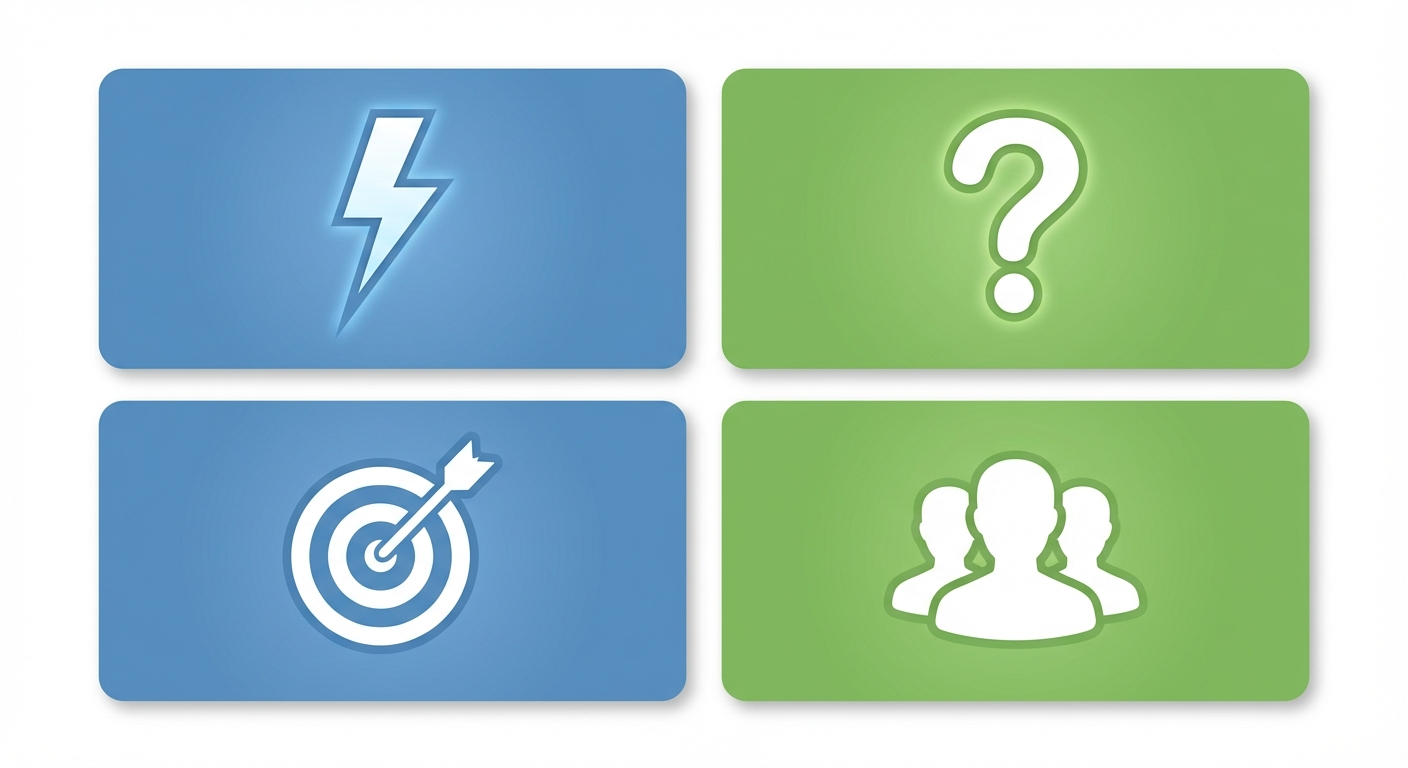 The four hook elements to evaluate in every winning creative you analyze.
How to Document Hook Analysis
For each ad you analyze, record:
- Hook type (pattern interrupt / curiosity / benefit / social proof / combination)
- Specific mechanism (what exact technique was used)
- First 5 words of text (the actual opening line)
- Visual hook element (what in the image/video stops the scroll)
- Your reaction (did it actually stop YOUR scroll? Why?)
This structured documentation is what separates useful analysis from passive browsing.
Step 3: Analyze the Ad Copy Structure
Once the hook has stopped the scroll, the ad copy needs to carry the reader through to the CTA. High-performing Facebook ad copy almost always follows a recognizable structural pattern — even when it looks casual or spontaneous.
The Core Copy Frameworks
PAS (Problem → Agitation → Solution): The most common structure in direct-response Facebook ads. The copy opens by naming a specific problem, amplifies the emotional weight of that problem, then introduces the product/service as the solution.
AIDA (Attention → Interest → Desire → Action): Broader structure often used in brand-awareness and consideration campaigns. The hook handles Attention, the body builds Interest and Desire, and the CTA drives Action.
Before/After/Bridge: Describes the reader's current state (Before), paints the desired outcome (After), and positions the product as the bridge between them. Common in health, fitness, and transformation niches.
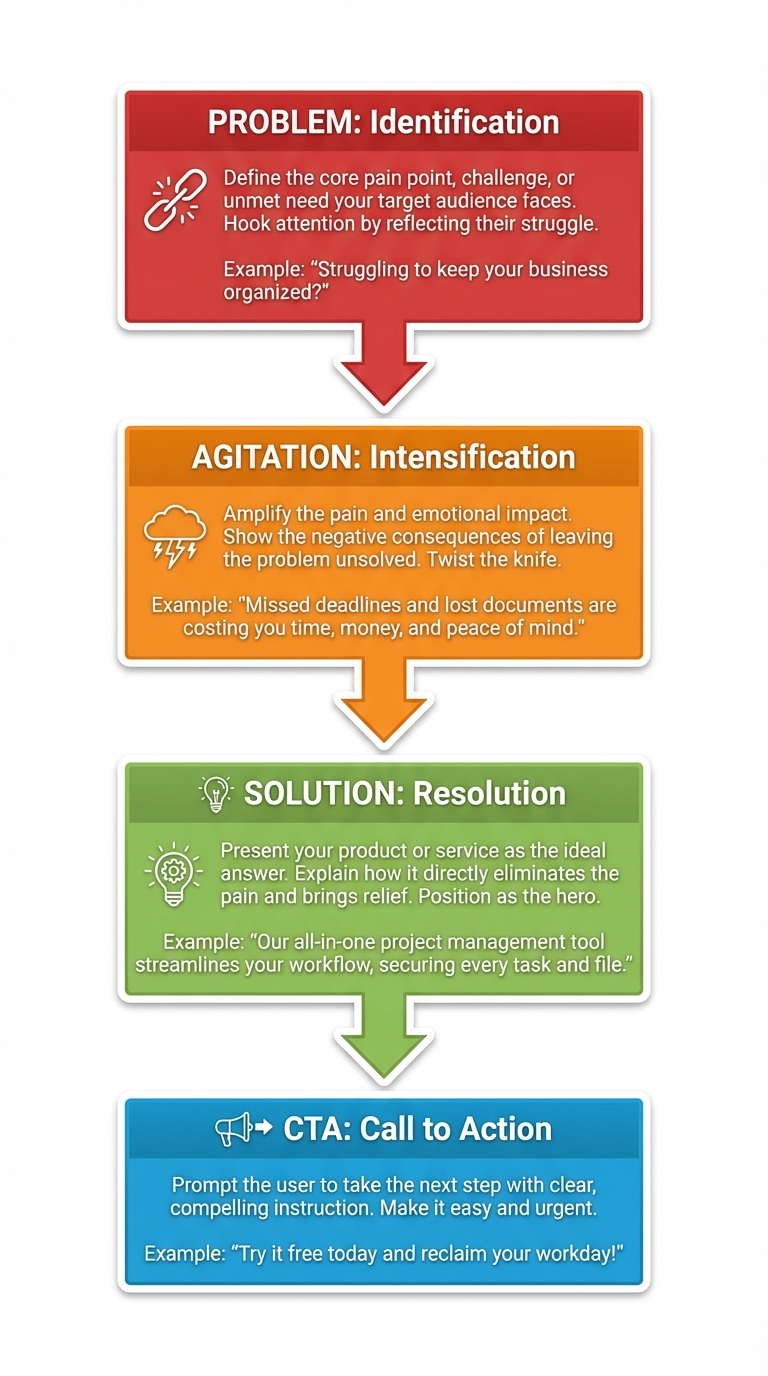 High-performing ad copy typically follows a Problem → Agitation → Solution → CTA arc.
Copy Elements to Document
For each winning ad, capture these elements:
- Copy length — Short (1–2 lines), medium (3–5 lines), or long (6+ lines / paragraph format)
- Framework used — PAS, AIDA, Before/After/Bridge, or hybrid
- Emotional driver — Fear, aspiration, frustration, curiosity, urgency, belonging
- Proof elements — Numbers, testimonials, case studies, before/after data
- Specificity level — Vague ("improve your results") vs. specific ("reduce CPA by 34% in 14 days")
- Line breaks and formatting — How whitespace is used to improve readability
- Emoji usage — Strategic placement (bullets, emphasis) vs. decoration
- Headline/description — The text in the link preview area below the creative
Copy Length Patterns by Niche
Through systematic analysis, you'll notice copy length correlates with product complexity and purchase decision weight:
- Impulse products (under $50, physical goods): Short copy, benefit-focused, urgency-driven
- Considered purchases ($50–$500, services): Medium copy, objection-handling, social proof heavy
- High-ticket offers ($500+, B2B, programs): Long copy, story-driven, extensive proof and logic
- Lead generation (free trials, webinars): Medium copy, curiosity-driven, low-commitment CTA
Track these patterns across your analyzed ads and you'll quickly build a playbook for your own niche.
Step 4: Break Down the Visual/Video Format
The visual component of a Facebook ad carries most of the communication load. Analyzing visual choices systematically reveals patterns you'd miss with casual observation.
For Static Images
Document these elements:
- Composition type — Product-focused, lifestyle/contextual, text-overlay, comparison, before/after
- Color palette — Dominant colors, contrast with typical feed background, brand consistency
- Text-on-image — Amount, font style, placement, readability at mobile size
- Human presence — Face visible (yes/no), eye contact with camera, emotional expression
- Product visibility — How prominently the product appears, staging context
- Aspect ratio — 1:1 (feed), 4:5 (optimized feed), 9:16 (Stories/Reels)
For Video Creatives
Add these layers:
- Opening frame — What's visible before play (this IS the hook for autoplay-off users)
- Pacing — Fast cuts vs. slow reveals; scene change frequency
- Audio strategy — Music, voiceover, captions, sound effects, designed-for-mute
- Caption/subtitle style — Burned-in text, auto-generated, no captions
- Duration — 15s, 30s, 60s, or 90s+ (shorter usually signals top-of-funnel)
- Production quality — UGC-style, mid-production, high-production studio
- Story arc — Does the video follow a narrative structure or is it product demo?
Format Performance Signals
When analyzing multiple winners in a niche, track which formats appear most frequently among long-running ads:
- If 70% of 30+ day runners in your niche are UGC-style videos, that's a clear format signal.
- If static images with text overlays dominate, don't start with high-production video.
- If carousels appear frequently for a competitor, it usually means they've tested and validated sequential storytelling.
Your goal is not to copy any single format but to identify the format patterns your target audience responds to.
Step 5: Map the CTA and Offer Strategy
The call-to-action is where creative analysis connects directly to conversion strategy. Many media buyers focus on hooks and visuals but skip the CTA and offer structure — which is where the money actually happens.
CTA Button Types and Their Signals
Facebook offers specific CTA button options, and the choice is deliberate:
- Shop Now — Direct purchase intent; product with clear price point
- Learn More — Information-seeking; longer sales cycle, higher consideration
- Sign Up — Lead generation; free trial or email capture
- Download — App install or lead magnet
- Play Game — Gaming vertical specific
- Get Offer — Discount/promotion-driven conversion
When you see a long-running ad using "Learn More" instead of "Shop Now," it tells you the advertiser's data shows that a softer CTA converts better for their audience — likely because the product needs more explanation before purchase.
Offer Structure Analysis
Beyond the CTA button, analyze the actual offer:
- Price anchoring — Is a higher price shown crossed out? What's the anchor-to-offer ratio?
- Urgency mechanism — Time-limited? Stock-limited? "Only X left"?
- Risk reversal — Money-back guarantee? Free trial? "Cancel anytime"?
- Bundle/bonus strategy — Main product + bonuses? Package deals?
- Social proof at CTA — Reviews count, star ratings, "X people bought this today"
Landing Page Alignment
Don't stop at the ad. Click through to the landing page and check:
- Does the landing page headline match the ad's promise?
- Is the visual style consistent (same images, colors, fonts)?
- How quickly does the page load?
- Is the CTA above the fold?
- What's the conversion mechanism (purchase, form, email capture)?
Ad-to-landing-page coherence is a major performance factor. The best creatives in the world fail if the landing page breaks the promise or creates friction.
Step 6: Build Your Swipe File System
Random screenshots in a folder is not a swipe file. A swipe file is a structured, searchable library of analyzed creative intelligence that you can reference when building new campaigns.
The Swipe File Structure
Organize each entry with these fields:
| Field | What to Capture |
|---|---|
| Date found | When you added it |
| Advertiser | Brand/page name |
| Niche/vertical | Product category |
| Days running | Longevity at time of capture |
| Hook type | Pattern interrupt / curiosity / benefit / social proof |
| Copy framework | PAS / AIDA / Before-After-Bridge |
| Format | Static / video / carousel + aspect ratio |
| CTA type | Button type + offer structure |
| Key insight | The ONE transferable lesson from this ad |
| Link | URL to the ad or saved creative |
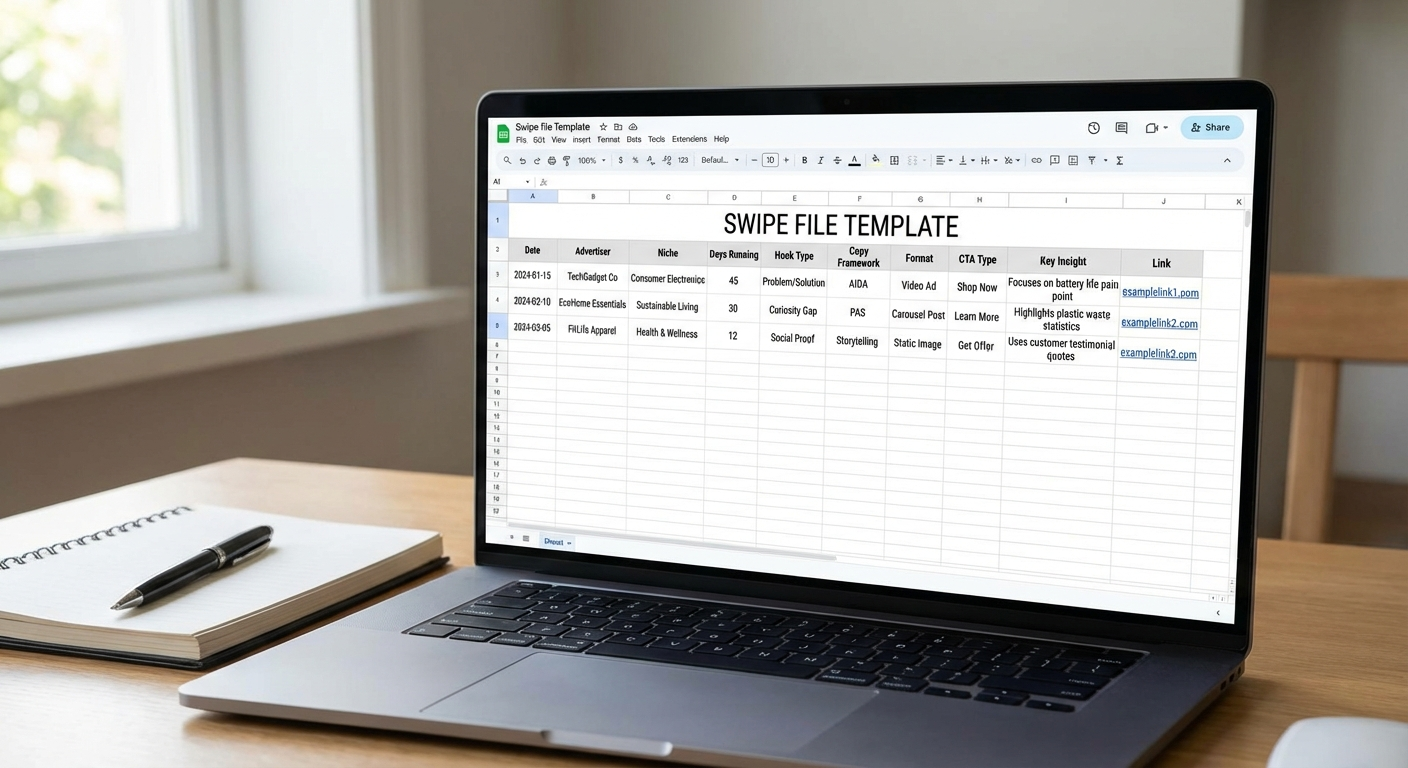 A structured swipe file turns random screenshots into actionable creative intelligence.
Tools for Swipe File Management
- Notion or Airtable — Best for structured, searchable databases with multiple views
- Google Sheets — Simple, shareable, good enough for most solo buyers
- Adligator Collections — Bookmark creatives directly during analysis for quick reference
- Figma/Miro — Visual boards for mood-boarding and pattern recognition across creatives
Swipe File Maintenance
A swipe file that grows without pruning becomes useless. Follow these maintenance rules:
- Review monthly. Remove ads that are no longer running — their insights may be outdated.
- Tag by insight type. "Great hook," "Strong CTA," "Unusual format" — so you can filter when you need specific inspiration.
- Separate by niche. Cross-niche inspiration is valuable, but keep your primary niche entries easily accessible.
- Track your own usage. When you use a swipe file entry to inspire a creative, note what you adapted and how it performed. This closes the feedback loop.
From Collection to Brief
When it's time to create new ads, don't stare at your swipe file hoping for inspiration. Use it systematically:
- Filter your swipe file for your target niche + format.
- Identify the top 3 hook types that appear most frequently among winners.
- Choose a copy framework that matches your product's complexity and price point.
- Select a visual format aligned with what's working in your space.
- Combine elements into a creative brief: "UGC-style video, curiosity gap hook, PAS copy structure, Sign Up CTA, free trial offer."
This is how systematic creative analysis translates into faster, higher-confidence creative production.
Build your swipe file faster — try Adligator's creative search free
From Analysis to Your Own Winning Creative
The framework above gives you the analytical tools. Here's how to bridge the gap between analysis and production.
The 80/20 Creative Brief
After analyzing 15–25 winning ads in your niche, you should be able to answer:
- What hook type works? — The dominant pattern (e.g., "curiosity gap hooks dominate fitness supplement ads")
- What copy length converts? — Short, medium, or long for your price point
- What format performs? — UGC video, static with text overlay, carousel
- What CTA structure converts? — Soft (Learn More) or hard (Shop Now), with what offer
- What emotional driver resonates? — Fear, aspiration, frustration, curiosity
These five answers form your creative brief. You're not copying any single ad — you're synthesizing patterns from validated winners into a strategic starting point.
Common Mistakes in Creative Analysis
Avoid these traps that waste analysis time:
- Analyzing one ad in isolation. Single ads don't reveal patterns. You need volume.
- Copying instead of adapting. Copying a competitor's ad gets you their results minus originality. Adapt the structure, not the content.
- Ignoring the landing page. The ad is half the system. The landing page is the other half.
- Focusing only on your niche. The best creative innovations come from cross-niche pattern transfer.
- Not tracking your own results. If you never close the loop between swipe file insights and your campaign performance, you're not learning — you're collecting.
- Analyzing old ads. Creative trends shift quarterly. An ad that crushed it 6 months ago may use a format or hook that audiences are now blind to. Focus on ads running within the last 30–60 days for freshest insights.
The Creative Testing Loop
Your analysis framework should feed directly into a testing process:
- Analyze — Use this 6-step framework to identify winning patterns
- Hypothesize — Form a specific hypothesis ("Curiosity gap hooks with UGC video and medium copy will outperform our current benefit-lead static images")
- Brief — Write a creative brief based on your synthesis
- Produce — Create 3–5 variations testing your hypothesis
- Test — Run with sufficient budget and duration for statistical significance
- Learn — Document results back into your swipe file and update your mental models
- Repeat — Your next analysis round is informed by what you've learned
This loop compounds. After three cycles, your creative hit rate should measurably improve because you're no longer guessing — you're building on systematic evidence.
FAQ
How many ads should I analyze before building my own creative?
Aim for 15–25 high-performing ads within your niche before drafting your first creative brief. This gives you enough pattern recognition across hooks, formats, and angles without drowning in data. If you're entering a completely new niche, lean toward 25. If you're iterating in a niche you know well, 10–15 focused analyses can be enough to spot new patterns.
Can I reverse-engineer ads from competitors outside my niche?
Yes — cross-niche analysis often reveals transferable creative patterns. A hook structure that works in fitness can be adapted for SaaS, and visual formats from e-commerce often translate well to info products. The key is to extract the structural element (hook type, copy framework, format choice) rather than the surface-level content. Some of the best-performing creatives are cross-niche adaptations that feel fresh precisely because the audience hasn't seen that approach in their feed before.
How do I know if an ad is actually performing well or just running a long time?
Long run duration is the strongest public signal of performance. Advertisers don't keep spending on ads that lose money. To increase your confidence, combine multiple signals: run duration of 14+ days, presence across multiple geos, creative duplication across ad sets, and active engagement. No single signal is definitive, but when three or four align, you can be reasonably confident the creative is profitable. Adligator's days active filter and geo count make it easy to stack these signals quickly.
Conclusion
The ability to reverse engineer winning Facebook ad creatives is what separates media buyers who consistently produce profitable campaigns from those who rely on creative guesswork. This framework — finding winners, deconstructing hooks, analyzing copy, breaking down visuals, mapping CTAs, and building a structured swipe file — gives you a repeatable system for turning competitor intelligence into your own creative advantage.
The hardest part isn't the analysis itself. It's finding ads worth analyzing in the first place. When you can filter by run duration, geo targeting, format, and platform to surface only validated winners, your analysis time goes directly toward high-value insights instead of sorting through noise.
Start with one niche, analyze 20 ads using this framework, and build your first structured creative brief from the patterns you find. Your second round will be faster. Your third will be faster still. That's the compound effect of systematic creative intelligence.
Ready to find winning creatives to analyze? Try Adligator free
Build your swipe file faster with Adligator's creative search
Related Reading
- Facebook Video Ad Spy: How to Analyze Competitor Video Creatives and Extract Winning Hooks
- How to Use Ad Spy Tools for Affiliate Marketing: Find Winning Facebook Offers Before Your Competition
- How to Analyze Facebook Ad Creatives by GEO and Vertical: A Data-Driven Approach for Media Buyers
- Facebook Ads for Mobile Apps: How to Spy on Competitor App Install Campaigns and Steal Their Best Creatives
