How to find ads by creative format (video, carousel, DCO, image)
Looking for video winners? Carousels only? DCO patterns? The Media format filter slices the grid by exactly the kind of creative you brief next.
When you are about to brief a designer, "find competitor ads" is the wrong query. The right query is "find competitor ads in the exact format I'm shipping." A carousel reference does not help a video editor. A DCO breakdown does not help a static-image briefing. The Media format filter cuts the grid down to only the format you care about.
The 30-second version
- Search a brand or phrase in Creatives.
- Click Add filter in the toolbar.
- Pick Media format from the menu — its option list opens beside it.
- Press the arrow-down key (or click the input) to open the option list.
- Click one or more formats. The grid filters live.
That is the recipe. The rest of this article covers what each format option actually means and which one to pick for the job you have.
The 11 format options, decoded
Adligator exposes all 11 formats Meta itself recognizes. Most users live in the first 4-5; the rest are niche but worth knowing.
| Format | What it is | When to pick it |
|---|---|---|
| Image | A static image with copy underneath | Briefing a static asset; baseline references |
| Video | A video creative (any aspect ratio) | Briefing a video editor; hook-pattern research |
| Carousel | Swipeable card format, up to 10 slides | Multi-product ecom, before/after layouts |
| DCO | Dynamic Creative Optimization — Meta auto-combines variants | Spotting brands at scale; algorithm-led creative |
| DPA | Dynamic Product Ads — catalog-driven | Pure ecommerce, retargeting analysis |
| Event | Facebook event promotion | Event marketing, ticket sales |
| Text | Text-only ad (rare on Meta) | Edge cases; usually low signal |
| Page like | Page-like growth ad | Brand-building campaigns, audience seeding |
| Multi images | Stacked images, non-swipeable | Long-form ecom, look-book style |
| Multi videos | Multiple videos in one ad unit | Heavy-production brands, creator showcases |
| Multi medias | Mixed image+video bundle | Hybrid format, rare but informative when found |
Step-by-step recipe
Step 1 — Search a starting set
Type either a brand (FB page autocomplete) or a phrase. Format filtering works on top of either query. Format is most useful when applied to either a brand-scoped grid (to see how one brand approaches a format) or a vertical phrase search (to see how a niche approaches a format).
Step 2 — Open the filter menu
Click Add filter in the toolbar. Eleven filters drop down; Media format is the first of them.
Step 3 — Pick a format
Click Media format and its option list opens beside the menu. Note that this one is a radio list, not checkboxes — you pick exactly one format at a time. (Before the 2026 redesign it was called "Display format" and allowed several at once.) Then press the green Apply filter button to commit.
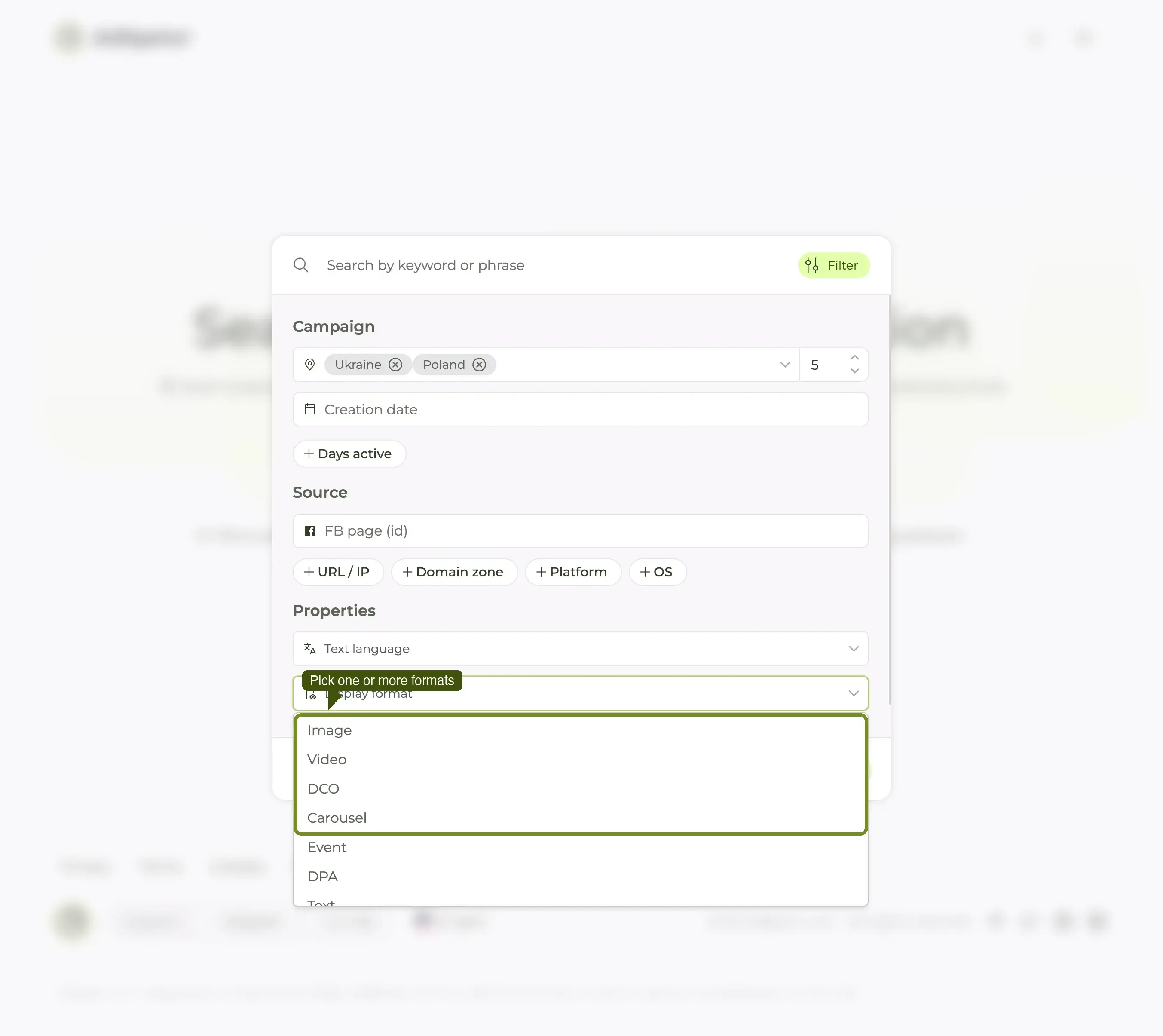
Note: clicking the chip alone does not populate the list. You need to either click the expanded input again or press the down-arrow key once the input is focused. PrimeVue dropdown quirk; documented behaviour.
Step 4 — Pick one or more formats
Click any format to toggle it on (checkbox style). Pick multiple to OR-combine — e.g. Video + Carousel returns ads in either format. Selected formats appear as pills inside the input; click × to remove.
The grid re-filters live. Close the panel (Esc or click outside) to see the full result count.
Three high-leverage recipes
Recipe A — "Show me their video winners"
The most-requested format slice.
- Search the brand.
- Filter: Media format = Video.
- Sort: Longest running.
- (Optional) Filter: Days active From = 30.
The top 5–10 cards are the brand's proven video creative. Read each for hook structure (first 3 seconds), pacing, and end-card CTA. Save the keepers to a Collection.
Recipe B — "Carousel patterns in vertical"
For ecom briefs where carousels usually carry the offer.
- Phrase search: vertical keywords (
skincare routine,coffee subscription). - Filter: Media format = Carousel.
- Sort: Longest running.
The grid now shows long-running carousels across the niche. Open the top ones and look at the slide-1 hook — that's the slide that has to earn the swipe. Slide 2-3 usually carries the proof; slide 4+ is product/CTA.
Recipe C — "Brands running heavy DCO"
Useful as a market-maturity signal. Heavy DCO usually means a brand with enough volume that they have delegated creative selection to Meta's algorithm.
- Phrase search: vertical or category.
- Filter: Media format = DCO.
- Sort: Longest running.
The advertisers with multiple long-running DCO ads in the result are the high-volume operators in the niche. Their non-DCO creative (re-search without the DCO filter) is usually the source material the algorithm is combining — also worth a look.
What format alone cannot tell you
The format filter answers "what shape is this ad?" — not "what is it saying" or "who is it for". Pair with other filters for sharper queries:
- Format + GEO + To — country-specific format winners. See filter by country.
- Format + CTA button — funnel-stage-specific format. Video + Sign up = lead-gen video; Carousel + Shop now = ecom carousel.
- Format + Language — localisation-specific format. Video + Ukrainian = market-specific video for the UA audience.
- Format + Visual Content — the sharpest combination in the app. Media format=Video plus a Visual Content object gets you "video ads that show a person holding the product" without watching a single one.
- Format + Days active — proven winners only inside that format. See find long-running winners.
The compound queries are where the app earns its keep. A single-filter search is fast; a four-filter search is where the answers usually live.
Common mistakes
- Filtering by Image alone in a high-Video vertical. Some verticals (DTC supplements, beauty, fitness) run 80%+ video. Filtering to Image returns mostly low-volume tests. Confirm the vertical's format mix in a Tracker's Analytics tab first — the Visuals panel gives you the image/video split outright.
- Confusing Carousel and DPA. Both can look like multi-slide ecom ads. DPA is catalog-driven (Meta picks the products dynamically); Carousel is hand-built (the advertiser picks the slides). For pure ecom research, filter to both.
- Forgetting that Media format and Platform interact. A Video ad on Instagram is almost always a Reel or Story (vertical, 9:16). A Video ad on Facebook can still be a horizontal feed video. Layer a Platform filter to see the placement-specific creative.
What's next
Format is one slice. The other two slices most marketers use weekly are run time (find long-running winners) and country (filter by country). Combine all three and you have a 60-second move that surfaces the top format-specific, market-specific, proven creative for any brand or niche.
Or, if you have collected enough format-specific winners to be useful: build a swipe file so the next time a designer asks "anyone got a reference for X?", the answer is one Collection link.
