How to find a brand's long-running winners (the ads they keep alive)
The ads a competitor keeps alive for 60+ days are almost always making them money. Here is how to surface only those.
"Find their long-running winners" is the single most valuable lookup you can run on a competitor. A 4-day ad is a test, a 30-day ad is a survivor, a 90-day ad is a confirmed money-maker. This recipe walks through the two-click move that strips a brand's grid down to nothing but the survivors.
The 30-second version
- Open Creatives, search the brand (FB page row from autocomplete).
- Open the sort dropdown → Longest running.
- (Optional, recommended) Add filter → Days active, set From = 30, then Apply filter.
- Scroll the top of the grid. The first 5–10 cards are the winners.
That is the whole recipe. The rest of this article is why each step matters and which knobs are worth turning when the default doesn't fit.
Why long-running ads matter so much
Performance marketers do not pay to keep losers in market. A media buyer with even a basic dashboard will swap a creative the moment its CPA drifts past target. When you see an ad that has been live for 73 days, you are looking at a creative that has survived 73 days of CPA scrutiny. That survival is the strongest signal an ad library can ever give you about whether a creative is profitable.
This is the asymmetric bet: the cost of paying attention to a long-running ad is one click; the cost of borrowing the wrong angle from a short-lived ad is a wasted week of design and a wasted media test budget.
Step 1 — Search the brand
Open Creatives and pick the brand from the FB-page autocomplete. The grid loads every ad that page is running, default-sorted by Newest in database — i.e. whatever Adligator indexed most recently. This default is the wrong sort for almost every research job, which leads to step 2.
If you don't know which page to pick (brand-name collisions, white-label, region-split brands), use the FB Pages tab first to find the right page, then come back to Ad Results.
Step 2 — Change the sort
Click the sort dropdown (top-right of the grid). Three options:
- Newest in database — when Adligator first indexed the ad. Useful for "what just launched" feeds; useless for finding winners.
- Recently launched — when the ad started running on Meta. Similar bias to newest.
- Longest running — descending by Days active. This is the one.
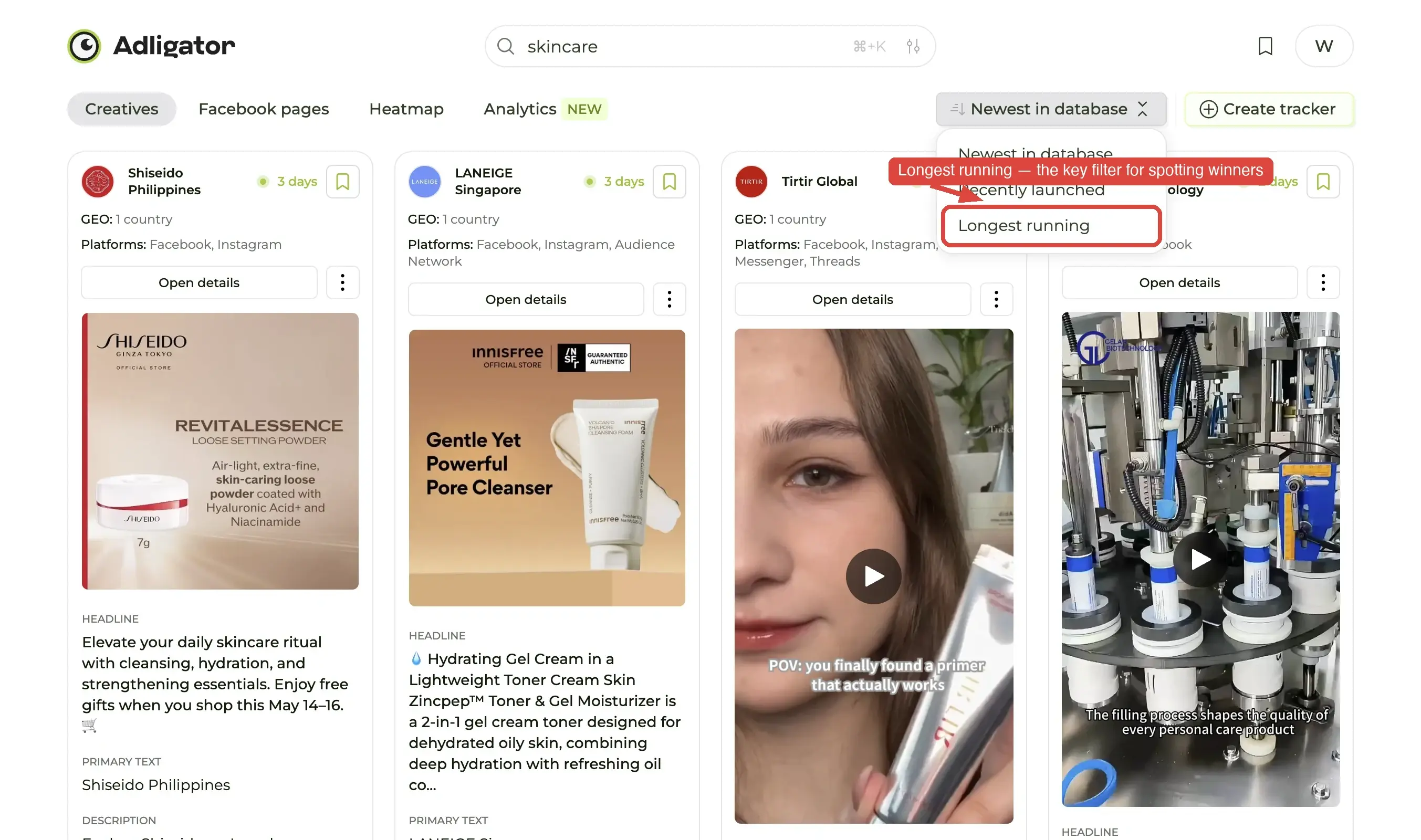
The grid re-ranks immediately. The top card is now the ad this brand has been paying to keep alive the longest. Walk down the list — the run-time badge on each card tells you exactly how many consecutive days the ad has been live.
Step 3 — Layer the Days active filter (optional but recommended)
Sort alone gives you the top of the list. The filter lets you cut a confidence threshold:
- Click Add filter and choose Days active.
- In the Campaign group, expand Days active.
- Set From = 30 and leave To blank.
- Apply.
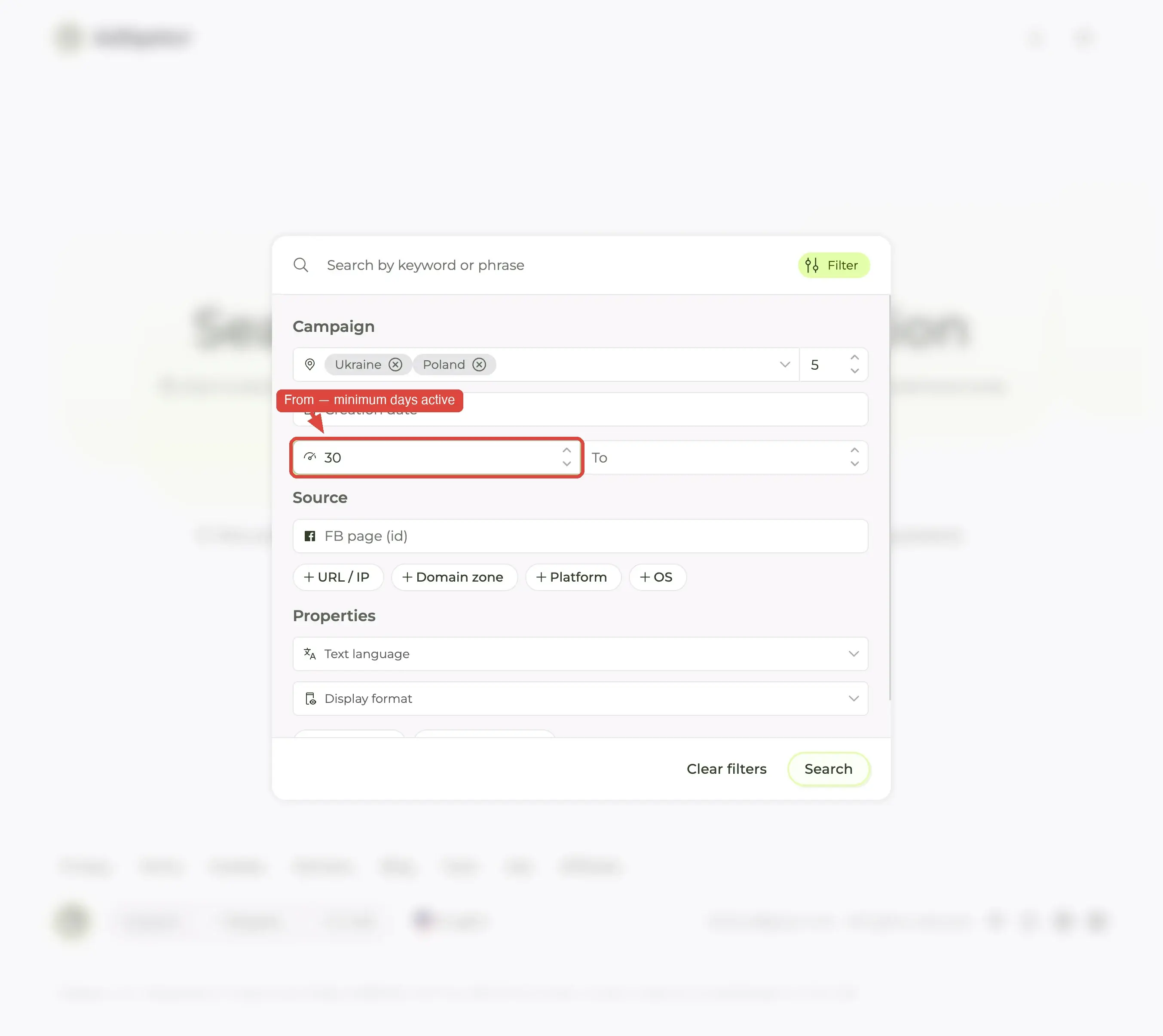
Set From = 30 and press Apply filter. Nothing changes in the grid until you do.
The grid now only shows ads that have been alive for 30+ days. Everything below that survival threshold is hidden. This is useful when you want to skip the test wave and look only at confirmed creative.
Tune by vertical:
| Vertical | From | Why |
|---|---|---|
| Ecom (DTC, fashion, beauty) | 30 | Short cycles; 30 days = a real signal |
| Lead gen (SaaS, finance, b2b) | 45 | Longer cycles; 30 days might still be testing |
| Subscription / fitness / health | 60 | Buyers convert slowly; longer LTV bets |
| Events / launches / drops | 7 | Bursts only run for weeks, not months |
If you have no idea, start at 30 and adjust based on what you see.
Step 4 — Read the survivors
Once the grid is filtered and sorted, the top 5–10 cards are doing a lot of teaching. Read each one for:
- The hook (first line of primary text). The opening 8–12 words are what the user reads in feed. Long-running ads have hooks that converted under repeated testing.
- The visual structure. Is it a UGC face-to-camera? A product close-up? A before/after? The format that survived for this brand will probably survive for similar brands.
- The CTA. Is the brand pushing Shop now (transactional), Sign up (lead capture), or Learn more (mid-funnel)? Long-running creative usually pairs the strongest CTA with the offer it has tested most.
For each card you want to study later, hover it and hit the save button in its action stack to drop it into a Collection. Name the collection by job, not brand — "Hooks that survived 60+ days" beats "SHEIN winners" because you will go looking for the pattern, not the brand.
Step 5 — Make it recurring
You will want to re-run this exact view next week and the week after. That is what Trackers are for:
- With the search + sort + Days active filter applied, click Save as Tracker above the grid.
- Name it with the job — "Ridge Wallet — proven winners".
- If you want to keep the query, press Save Search — it pins the keyword, the Days active filter and the sort to the sidebar. If you want to watch the brand, create a Tracker on its page instead.
A Tracker also unlocks the Analytics tab, which is especially useful here: Launches tells you whether the brand is still adding to its winners shelf, Content tells you which headline and CTA they have settled on, and Visuals tells you the format that compounded.
Common mistakes
- Sorting without filtering when the brand has lots of short tests. Some brands run 200 ads at once, most of them 4-day tests. Pure Longest running sort still works, but layering Days active From=30 makes the result more readable.
- Setting Days active too high too soon. From=90 looks rigorous but often empties the grid. Start at 30, see how the survivor curve looks, then climb.
- Ignoring the inactive long-runners. An ad that ran for 200 days and then stopped 2 weeks ago is still a fantastic teardown candidate. To include those, set Last seen active to 30 days; that catches recently-paused longs without bringing back ancient history.
What's next
Long-running winners are the what worked. The next layer is what kind of creative worked — drill into the survivors by Media format (find ads by format) to see whether the brand's winners skew video, carousel, or DCO. And once you have a winners shortlist worth keeping, the Collections workflow is the next recipe in the sequence.
