How to build a swipe file in Adligator (Collections workflow)
Stop screenshotting ads into a Google Drive. Use Collections to build a folder of references your design team can actually browse, search, and share.
Every media buyer ends up with the same problem: a folder of ad screenshots, a Notion table of "good references", and a Slack channel of "look at this", none of which is searchable, none of which the designer ever opens, and all of which decays the moment Meta pulls the original ad. Adligator Collections solves all three. This recipe walks through the workflow that turns ad-hunting into a compounding asset.
The 30-second version
- Run a high-signal search (e.g. Longest running + GEO + Format).
- Save every keeper — one click per card, from the card's hover actions.
- Open Collections in the sidebar and name each folder by job, not by brand.
- Share the folder link with your designer when briefing.
That's it. Below: how to do each step well enough that the folder is still useful three months from now.
Step 1 — Run a signal-dense search
The quality of your swipe file is downstream of the quality of your search. Three searches that almost always produce keepers:
- Brand winners. Pick a competitor → Sort by Longest running → filter Days active From=30. Top 5-10 are the brand's proven creative.
- Vertical winners. Phrase search the niche → Sort by Longest running. Top of the grid is the niche's evergreen patterns.
- Format-specific winners. Any of the above + filter Media format = Video / Carousel / DCO. Targeted by the kind of creative you're about to brief.
Each of these is a separate Academy recipe — find long-running winners, filter by country, find ads by format. The point: do not save randomly. Run a query that already has signal, then save what survives the query.
Step 2 — Save with intent
Hover any ad card and four buttons appear at its top-left. The second — the folder icon — opens the Add to collection picker. Click a folder and you are done.
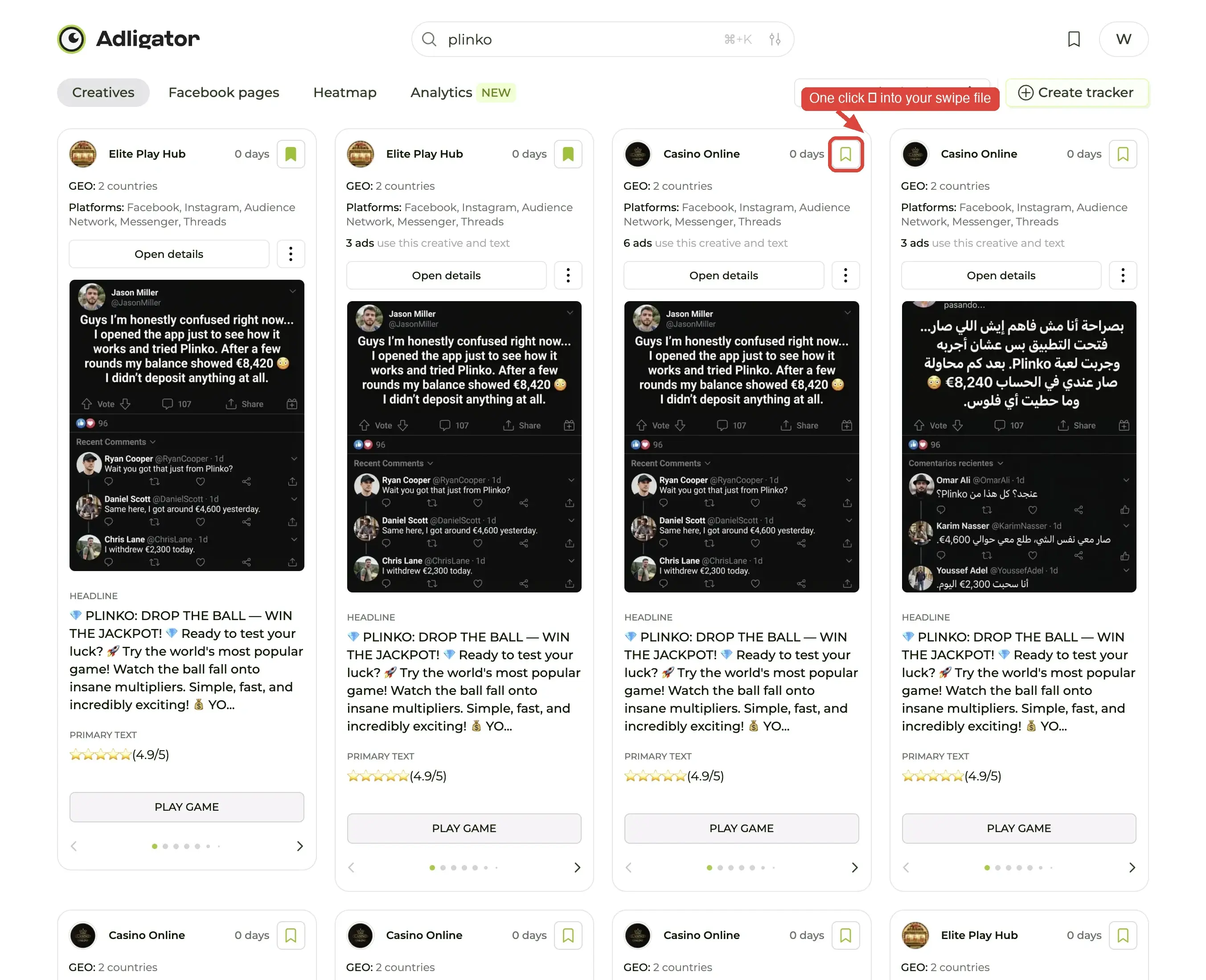
The discipline that matters: save only what teaches. The trap is saving 50 ads from one brand and remembering nothing about why each was worth saving. Aim for 5-15 ads per query, each one carrying a distinct lesson — a hook structure, a visual pattern, a copy formula, an offer framing.
If you find yourself wanting to save more than 15 from a single search, you are probably saving a brand, not a swipe file. Brand monitoring belongs in a Tracker; swipe files are about transferable patterns, which are rarer.
Step 3 — Name folders by job, not by brand
This is the single rule that determines whether your swipe file gets opened next month or buried forever.
- ❌ "SHEIN ads" — folder name describes who, not why. Useless when you're briefing a non-SHEIN brand.
- ❌ "Q3 saves" — folder name describes when, not why. Useless for everything.
- ✅ "Hooks that survived 60+ days" — folder name describes the pattern. You'll go looking for hooks.
- ✅ "UGC face-to-camera, ecom" — describes the briefable shape.
- ✅ "Single-country, single-product carousels" — describes the use case.
Every folder name should answer the question "next time I open this, what am I going to be looking for?" If the name does not survive that question, rename it.
Open Collections in the sidebar, then the ⋮ menu on a folder → Edit collection to rename it. To move an ad, open its save picker again and tick a different folder. When someone wants the folder as data rather than pictures, Download CSV inside the folder exports it.
Step 4 — Share when briefing
When you brief a designer, do not paste 12 screenshots into a doc. Share the Collection link.
The link renders the same card layout the designer would see inside Adligator — visual, copy, run time, format, GEO, platforms. They can play videos, browse the carousel slides, and read full primary text without leaving the link. No Adligator account required.
A few habits that make this work:
- One folder per brief. Briefing a new video campaign? Make a folder named after the brief, drag in the 8-12 ads that actually inform it, share that folder. Don't share a 200-ad omnibus.
- Order matters. The cards appear in save order (most recent first). Save your best three references last so they sit at the top.
- Add a one-paragraph note alongside. The Collection link tells them what; you still need to tell them why. One paragraph in the brief explaining what pattern to extract from the references closes the loop.
Maintenance — keep the file alive
A swipe file decays at the rate of one ad per week. Meta pulls ads, brands change strategies, formats fall out of fashion. Two habits keep yours useful:
- Quarterly prune. Open each folder. Anything older than 90 days that didn't directly inform a winning campaign? Archive or delete. Old references are worse than no references because they distort taste.
- Monthly add. Run your three favorite signal-dense searches once a month and add the new keepers. Five new ads per folder per month is a healthy rate.
What good looks like — a sample structure
A realistic swipe file for a media buyer running ecom campaigns:
📁 Hooks — first 8 words (12 ads)
📁 UGC face-to-camera, ecom (10 ads)
📁 Carousel slide-1 hooks (8 ads)
📁 Before/after structure (6 ads)
📁 DCO references — high volume brands (15 ads)
📁 IG Reels — vertical-first creative (9 ads)
📁 Single-country tailored ads — UK (7 ads)
Seven folders, ~70 ads, all organized by what the designer will be briefing. That structure is worth more than 700 random saves.
Common mistakes
- Saving the same ad to three folders. Pick the dominant lesson and save once. If an ad teaches both "great hook" and "great carousel structure", the hook lesson is usually more transferable — save under that.
- Naming folders after brands. See step 3.
- Sharing the full default Collection. The default folder is your scratchpad. Designers don't need your half-saved exploration.
- Letting the file grow past 100 ads in one folder. If a folder has more than 100 ads, it is two folders pretending to be one. Split it.
What's next
A swipe file is the what worked memory. The other half of competitive intelligence is the what's changing feed — that's what Trackers are for. The two work together: Trackers surface new ads; Collections preserve the keepers. Once both habits are running, you have a competitive-intelligence layer most teams never reach.
Or, if you have multiple competitors worth comparing in one view, the next recipe is compare two competitors — Trackers + Analytics side-by-side.
