
How Many Active Ads Is That Page Running? How to Check — and What the Number Tells You
The fastest way to size up a competitor on Meta is one number: how many ads their page is running right now. Before you enter a niche, copy an angle, or explain to a client why their competitor is everywhere, the Facebook Ad Library active ads count is the first thing worth checking — it takes about 60 seconds and tells you whether you're up against a hobbyist or a machine.
The catch is that getting the number is only half the job. The Ad Library gives you an approximate figure with real blind spots, and even an exact count means nothing without context: 40 ads is a lot for a local service business and a rounding error for Temu. This guide covers three ways to get the count — and the part most guides skip: how to read it like a media buyer.
What the active ads count tells you (and what it doesn't)
The active ads count is a proxy for advertising activity, and a decent one:
- Testing intensity. A page holding 100+ concurrent ads is systematically testing creatives, not boosting posts.
- Commitment to the channel. Nobody maintains 300 live ads casually. A consistently high count means Meta is a core acquisition channel for that brand.
- Scale ambitions. Counts that climb week over week usually precede or accompany a scaling push.
What it does not tell you:
- Budget. Ad count is not ad spend. A page can run 200 near-duplicate versions on $50/day, or 6 ads with five figures behind each. If budget is the question, you need a spend-estimation method that also weighs duplicates, longevity, and geography.
- Performance. Live doesn't mean profitable. An ad that's survived 90 days is a much stronger signal than 90 ads launched yesterday — here's how to tell which competitor ads are actually winning.
With that frame, let's get the number.
Method 1: counting in the Meta Ad Library — and where it breaks
The Meta Ad Library is free and needs no account:
- Open the Ad Library and set the country (or "All").
- Search the brand and select its page from the dropdown.
- Set Ad status to Active.
- Read the results count at the top — something like "~490 results".
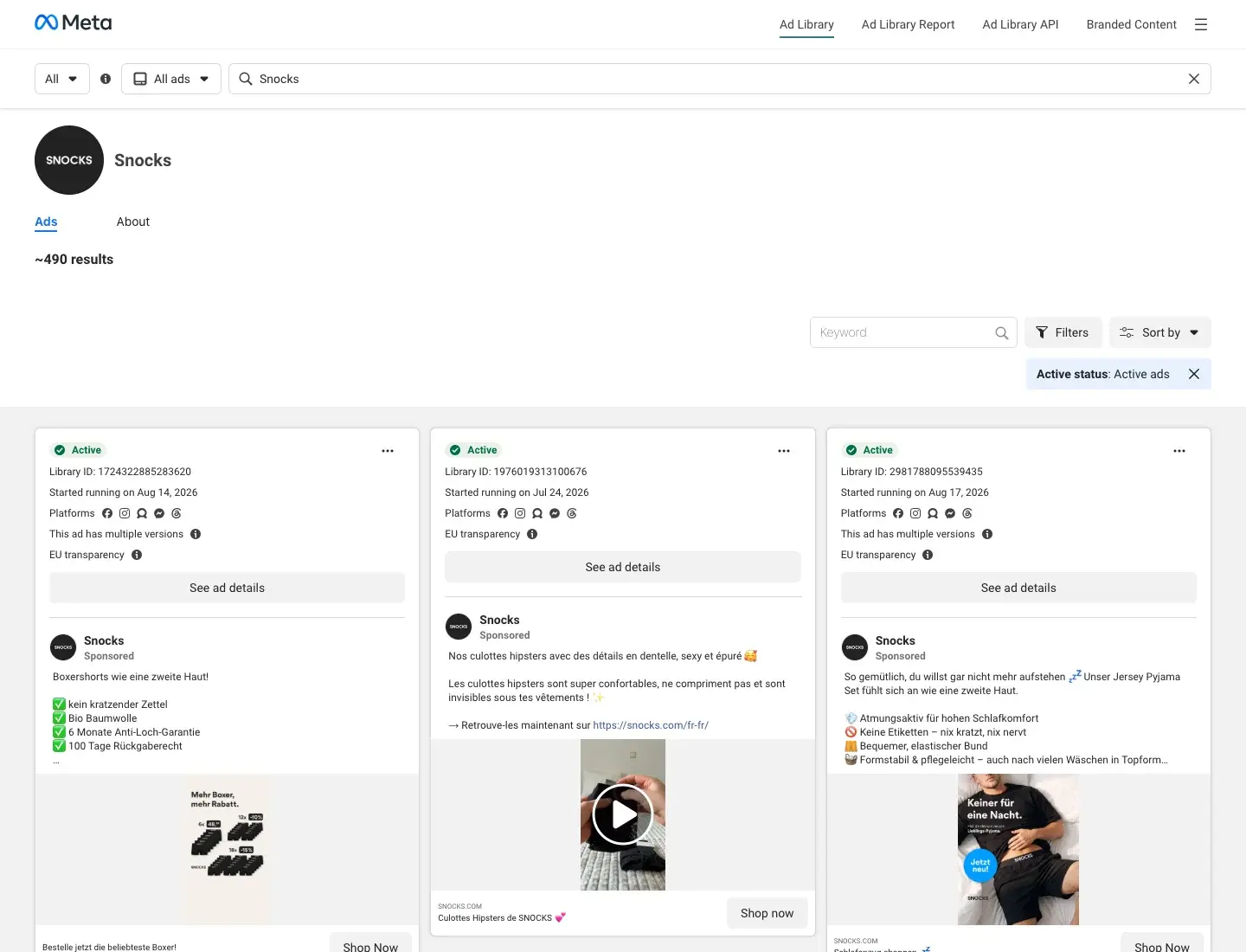 Meta Ad Library, Snocks page, Ad status = Active: the count is approximate and can't be sorted or exported
Many older guides claim the Ad Library shows no count at all and you have to scroll and tally cards by hand. That's outdated — a page-scoped search does display an approximate total. But four limits remain:
- The tilde is real. "~490" can wobble day to day without any real change in the account, and ads with multiple versions are counted inconsistently — you can't tell 490 delivering ads from 300 ads with variants.
- One page at a time. There's no way to rank pages by ad count, compare two competitors side by side, or aggregate a brand's multiple pages.
- No history. The Library shows now. Whether that page ran 50 or 900 ads last month — the context that makes the number meaningful — is gone.
- Active only. Except for special categories like political ads, you can't see what the page tested and killed, which is where the real lessons live.
Manually re-checking competitor pages weekly and pasting counts into a spreadsheet works — for about two weeks, which is when most people stop doing it.
Method 2: exact per-page ad counts in Adligator
In Adligator, the count is a search result, not a scroll-a-thon. Type a brand name into search and open the FB Pages tab: every page that has run at least one matching ad appears with its Page Likes, lifetime Total Ads, and currently indexed Active Ads — exact numbers, sortable by total.
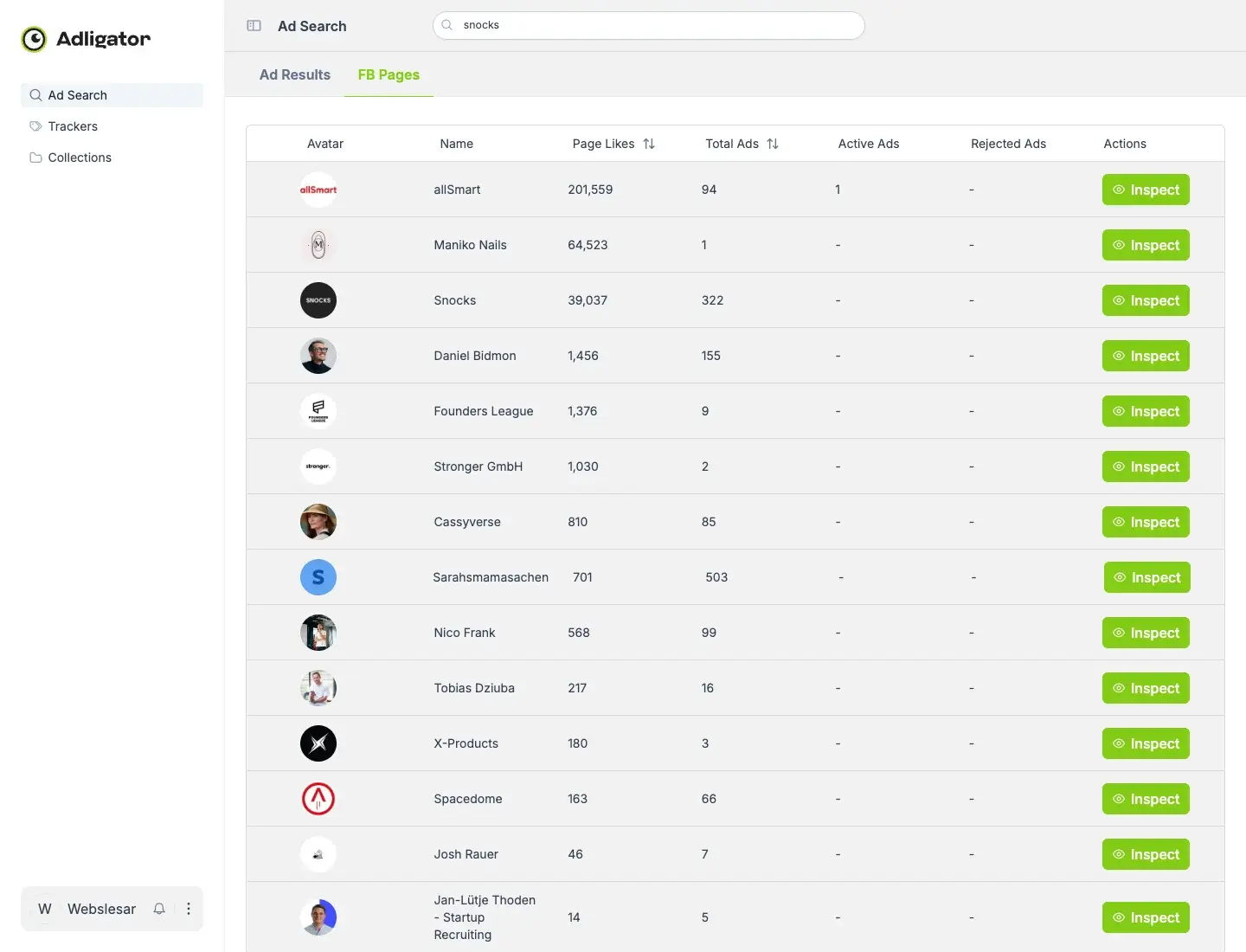 Adligator's FB Pages tab: exact lifetime ad totals per page — Snocks shows 322 indexed ads
Searching "snocks" (a German DTC socks-and-basics brand) surfaces the brand page with 322 ads in the library and 39,037 likes — and, just as usefully, the ecosystem around it: an affiliate page with 94 ads, creators with 85, micro-advertisers with 1. One search, and you know who's actually spending in the niche.
Two things the row numbers mean, precisely:
- Total Ads is page-lifetime. It's every ad Adligator has ever indexed from that page — a measure of cumulative testing volume, not today's campaign. The keyword only decides which pages appear in the list, not how the row numbers are computed.
- From any row, one click gets the detail. Inspect the page and you're in its full ad list, sortable by longest running, filterable by format, GEO, and date — the qualitative layer the count alone can't give you.
Soft CTA: Stop scroll-counting the Ad Library — search by page or domain instead
Method 3: counting by domain when a brand runs multiple pages
Big advertisers rarely live on one page. Count only the main page and you can undercount a brand by an order of magnitude.
Temu is the extreme case. Its main page shows 161,972 total ads (3,884 currently active). But the same search's FB Pages tab reveals the network: Shoptemu with another 374,005 ads, Temu United Kingdom with 21,528, Temu Poland with 18,318, Temu Mexico with 12,395, plus national pages for Portugal, Italy, Colombia, South Africa and more. In total, Adligator's library holds 759 pages named "Temu" — including impostor pages riding the brand, which are their own research topic.
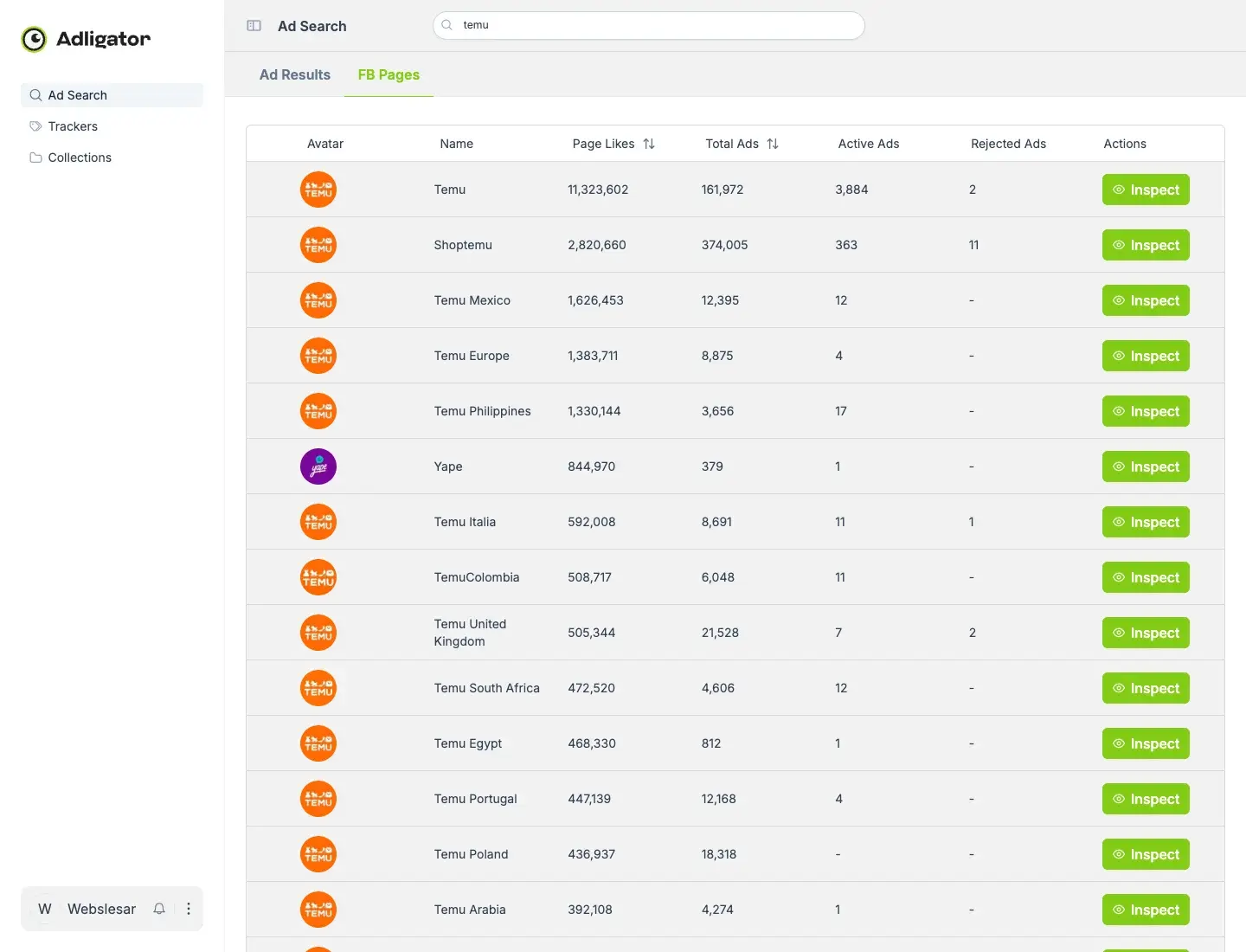 One brand, many pages: Temu's network in Adligator — the main page alone shows 161,972 total and 3,884 active ads
Two ways to catch the full footprint:
- Name search → FB Pages tab, as above. Sort by Total Ads and sum the pages that are genuinely the brand (check the likes count and profile link — a "Temu" page with 15 likes isn't Temu).
- Domain search. Filter ads by landing-page domain (e.g.
temu.com) and every page funneling traffic to that domain shows up — including white-label and regional pages whose names don't match the brand at all. In the Ad Library, this entire class of question is simply unanswerable.
Benchmarks: what 10 vs 100 vs 1,000+ active ads means
Exact numbers need interpretation ranges. From the pages above and the wider library, here's how experienced buyers read counts — with the caveat that these are heuristics, not laws:
| Active ads | Typical advertiser | What it usually means |
|---|---|---|
| 1–10 | Local business, side project | Boosted posts or a single evergreen campaign. Little testing. Weak competition signal — or a very disciplined account with few, heavily funded ads. |
| 10–50 | SMB in growth mode | Real but modest program — like Sweat Box Sauna, a niche DTC advertiser with 31 lifetime ads. Structured campaigns, occasional creative refresh. |
| 50–300 | Scaling DTC / lead-gen brand | Systematic creative testing. Snocks' 322 lifetime ads fit here: constant iteration, seasonal pushes, multiple markets. |
| 300–1,000 | Aggressive performance advertiser | Full-time creative team or agency. The Ridge holds 1,960 lifetime ads, roughly 760 of them seen in the last 7 days — an always-on testing machine. |
| 1,000+ | Aggregator / marketplace / mega-DTC | Temu territory. Industrialized production, often DPA/DCO-heavy, where much of the "count" is feed-generated variants. |
Read the count relative to the advertiser type, and remember the denominator effect: 300 ads at a marketplace is mostly catalog automation; 300 ads at a single-product brand is a creative-testing war.
Reading spikes: testing bursts, scaling pushes, seasonal ramps
A single count is a photo; the movement is the film. When a count jumps, there are three common plots:
- Testing burst. Dozens of new ads appear, most die within days. Duplicate counts stay low, and the survivors keep running. The page is hunting for a new winner — often a sign the old ones fatigued.
- Scaling push. The count rises and the same creatives appear in multiple copies. Duplicating a proven ad across ad sets is the classic scale move; rising copies with rising longevity means they found something that converts.
- Seasonal ramp. Count climbs on schedule — Q4, back-to-school, local sales events. If your competitor's count doubles every October, plan your creative pipeline for September.
This is where a one-off check stops being enough — no library screenshot tells you when the ads appeared. Put a tracker on the page in Adligator and the Analytics tab draws the launch history for you:
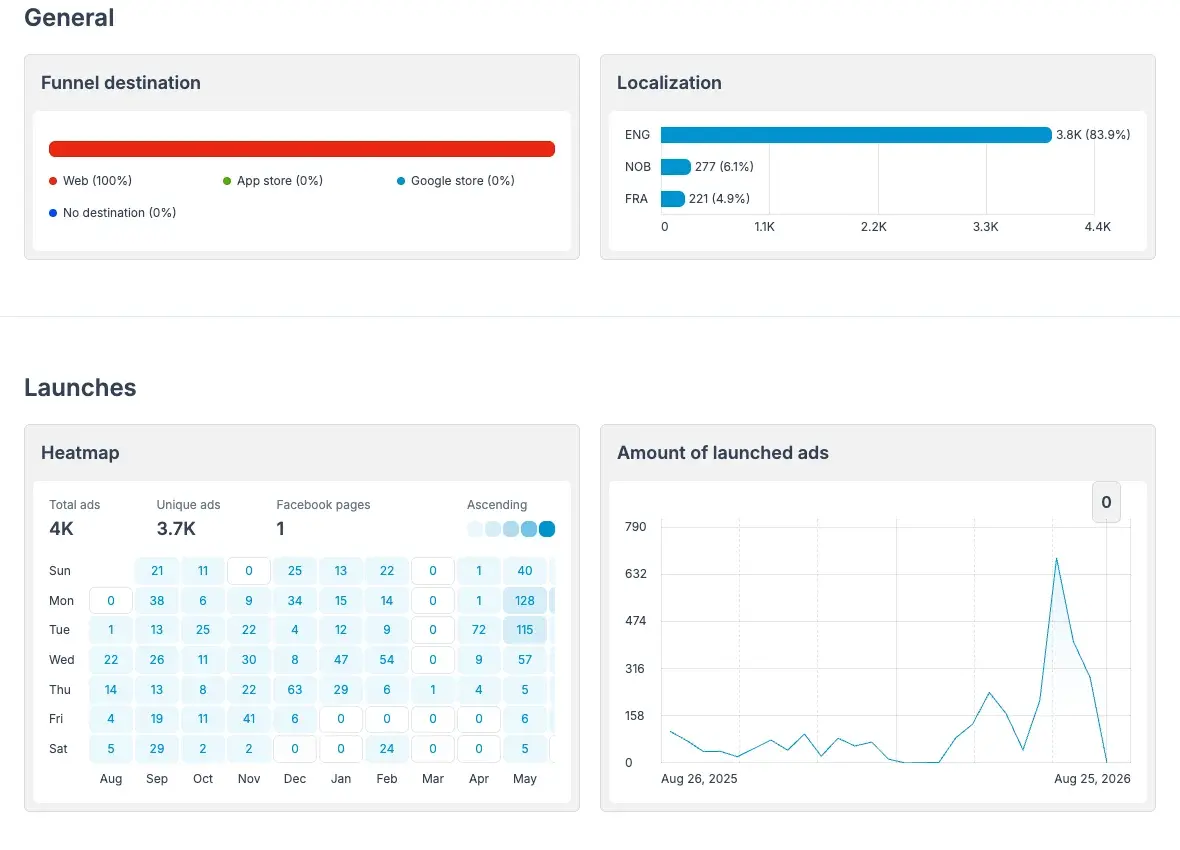 Tracker Analytics for The Ridge: the launch chart turns a one-off count into a story — note the ~690-launch spike
The Ridge's tracker shows about 4,000 launches over the past year with a spike of roughly 690 new ads in a single week of summer 2026 — a scaling push you'd never reconstruct from manual weekly checks. The weekday heatmap adds a second layer: which days the brand ships new creatives, useful for timing your own monitoring routine.
Caveat: lifetime totals vs active-right-now
The single most common mistake with ad counts is mixing up two different questions:
- "How much has this page advertised?" → lifetime totals. Adligator's Total Ads column answers this: cumulative indexed ads, the page's testing history. Snocks at 322 means 322 ads ever indexed — not 322 running today.
- "How much is this page running right now?" → active counts. The Ad Library's "~490 results" for Snocks answers this (approximately), as does Adligator's Active Ads column and date-scoped searches.
The two can legitimately diverge — Snocks' live active count (~490) currently exceeds its indexed lifetime total (322) because the brand is mid-burst with many fresh ad versions that a crawler-based index picks up with a lag. That's two instruments measuring different things at different moments, not a contradiction. The practical rules: never quote a lifetime total as "currently running"; cross-check load-bearing right now claims in the live Ad Library; and for anything involving history, comparison, or aggregation — where the Library can't help — use the indexed library and let a tracker keep the history from today forward.
FAQ
Does the Meta Ad Library show the total number of ads a page runs?
For a single page it shows an approximate figure like "~490 results" once you filter to that page and set Ad status to Active. It's an estimate, it counts ad versions inconsistently, it can't be sorted or aggregated across pages, and there's no history of how the number changes.
Why does the ad count change day to day?
Advertisers launch and kill ads constantly. Testing-heavy accounts rotate dozens of creatives per week, and seasonal pushes can double a count in days. That's why a single snapshot is weak evidence — the direction the count moves matters more than the number itself.
Is a high ad count always a sign of a big budget?
No. A page can run 200 near-identical ad versions on a small budget, or 6 ads with huge spend behind each. Ad count is a proxy for activity and testing intensity. Combine it with duplicate counts and ad longevity before you draw budget conclusions.
Can I see historical (inactive) ads too?
The Ad Library only shows inactive ads for special categories like politics. An ad intelligence library such as Adligator keeps indexed ads after they stop running, so you can see what a page tested and killed — not just what's live today.
Conclusion
Checking a Facebook page's active ads count is the quickest competitor-sizing move on Meta — as long as you read the number in context. The Ad Library gives an approximate, single-page, no-history snapshot; Adligator gives exact per-page totals, domain-level aggregation, and — through trackers — the launch history that turns a number into a signal. Whichever surface you use: the count measures activity, not budget or performance. For the full picture, pair it with what the Ad Library can and can't do.
Ready to apply this workflow? See any page's exact ad count in seconds — try Adligator free
Related Reading
- How to Estimate Competitor Facebook Ad Spend Using Spy Tools and Ad Library Data
- How Much Does Gymshark Spend on Facebook Ads? A Reverse-Engineered Estimate
- How to Use Meta Ad Library API for Automated Competitor Monitoring at Scale
- Competitor Landing Page & Funnel Analysis: How to Decode Facebook Ad Funnels
